<?xml version="1.0" encoding="utf-8"?>
<feed xmlns="http://www.w3.org/2005/Atom">
 
 <title>Justin Voss</title>
 <link href="http://justinvoss.com/atom.xml" rel="self"/>
 <link href="http://justinvoss.com/"/>
 <updated>2012-02-18T17:29:09-06:00</updated>
 <id>http://justinvoss.com/</id>
 <author>
   <name>Justin Voss</name>
   <email>justin@bleedingwolf.com</email>
 </author>

 
 <entry>
   <title>Skip Tunes for Mac</title>
   <link href="http://justinvoss.com/2012/02/13/skip-tunes/"/>
   <updated>2012-02-13T00:00:00-06:00</updated>
   <id>http://justinvoss.com/2012/02/13/skip-tunes</id>
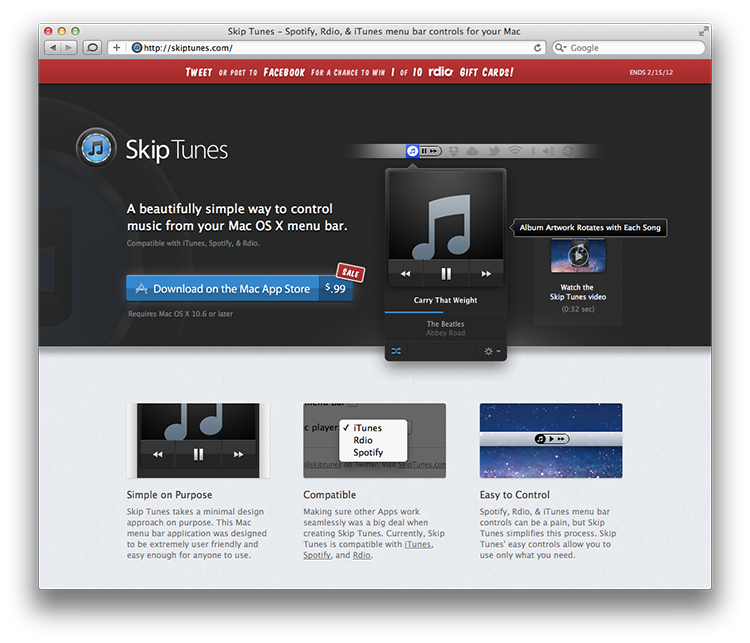
   <content type="html">&lt;p&gt;Last week, my latest client project went live on the App Store. I&amp;rsquo;m thrilled to (somewhat belatedly) announce &lt;a href=&quot;http://skiptunes.com/&quot;&gt;Skip Tunes&lt;/a&gt;,
a menu bar app for controlling iTunes, Rdio, and Spotify. It&amp;rsquo;s on sale right now for just &lt;a href=&quot;http://bit.ly/skip-tunes-app&quot;&gt;$0.99 on the Mac App Store&lt;/a&gt;.&lt;/p&gt;

&lt;p&gt;&lt;a href=&quot;http://www.gregdougherty.com/&quot;&gt;Greg Dougherty&lt;/a&gt;, my client, has done a great job getting press attention for the app.
So far, it&amp;rsquo;s been mentioned on &lt;a href=&quot;http://www.tuaw.com/2012/02/13/daily-mac-app-simple-skip-tunes-feels-like-it-should-be-part-of/&quot;&gt;The Unofficial Apple Weblog&lt;/a&gt;, &lt;a href=&quot;http://howto.cnet.com/8301-11310_39-57373279-285/gain-easy-control-of-your-music-with-mac-app-skip-tunes/&quot;&gt;CNET&lt;/a&gt;, &lt;a href=&quot;http://lifehacker.com/5882964/skip-tunes-gives-you-menu-bar-access-to-controls-for-rdio-spotify-and-itunes&quot;&gt;Lifehacker&lt;/a&gt;, 
&lt;a href=&quot;http://www.cultofmac.com/146543/skip-tunes-a-simple-way-to-control-itunes-or-spotify-from-your-macs-menu-bar-review/&quot;&gt;Cult of Mac&lt;/a&gt;, &lt;a href=&quot;http://www.macworld.com/article/165456/2012/02/skip_tunes_is_a_simple_and_elegant_music_controller.html&quot;&gt;Macworld&lt;/a&gt; (3.5 out of 5 Mice) and a few other websites.
Not long after launching, it even climbed to the #1 Music app in nine different countries!&lt;/p&gt;

&lt;p&gt;&lt;img width=&quot;750&quot; height=&quot;643&quot; src=&quot;/static/post_assets/2012-02-13-skiptunes-website.png&quot; alt=&quot;&quot; /&gt;&lt;/p&gt;

&lt;h2 id=&quot;behind-the-scenes&quot;&gt;Behind the Scenes&lt;/h2&gt;

&lt;p&gt;&lt;em&gt;Warning: serious technical details ahead.&lt;/em&gt;&lt;/p&gt;

&lt;h3 id=&quot;chameleon&quot;&gt;Chameleon&lt;/h3&gt;

&lt;p&gt;When I started working on the custom UI for the app, I tried to use the AppKit collection of classes:
&lt;code&gt;NSView&lt;/code&gt;, &lt;code&gt;NSButton&lt;/code&gt;, &lt;code&gt;NSTextField&lt;/code&gt;, and friends. It didn&amp;rsquo;t take long before I was really frustrated with
how hard it was to customize the appearance of these controls. For example, on iOS it&amp;rsquo;s easy to use
a custom image as the background of a &lt;code&gt;UIButton&lt;/code&gt;, you just call &lt;code&gt;setBackgroundImage:forState:&lt;/code&gt;.
Using that method, you can even specify two different images: one to use normally, and another
to use when the control is actually being pressed.&lt;/p&gt;

&lt;p&gt;Getting the same thing done with &lt;code&gt;NSButton&lt;/code&gt; is not so easy.&lt;/p&gt;

&lt;p&gt;The most straightfoward way to get a custom image is to subclass &lt;code&gt;NSButtonCell&lt;/code&gt; and
override it&amp;rsquo;s &lt;code&gt;drawBezelWithFrame:inView:&lt;/code&gt; method, which is not at all obvious if 
you&amp;rsquo;re not familiar with the way &lt;code&gt;NSControl&lt;/code&gt; uses cells for drawing.
Then, for each button, you have to instruct it to use your custom 
cell class instead of the default class.
To show a different image when the button is pressed, your implementation of that 
cell method has to inspect the &lt;code&gt;isHighlighted&lt;/code&gt; property to see if the user
is holding down the mouse button.
When drawing that &lt;code&gt;NSImage&lt;/code&gt;, you need to make sure you use the right drawing method that respects
the flipped or non-flipped setting for the image and the graphics context.&lt;/p&gt;

&lt;p&gt;None of the above is rocket science, but it&amp;rsquo;s a lot of work for what seems like a really easy task.
(Kudos to the UIKit team for taking the opportunity to rethink and clean up these interfaces.)&lt;/p&gt;

&lt;p&gt;Instead of wrangling all this myself, I took a shortcut and used an open
source framework called &lt;a href=&quot;http://chameleonproject.org/&quot;&gt;Chameleon&lt;/a&gt;.&lt;/p&gt;

&lt;p&gt;Created by &lt;a href=&quot;http://iconfactory.com/&quot;&gt;The Iconfactory&lt;/a&gt;, Chameleon is a re-implementation of a big chunk
of UIKit on top of AppKit. In a nutshell, it lets developers write iOS code
that runs on OS X.&lt;/p&gt;

&lt;p&gt;Chameleon really shines when you want to use the same code to produce both an iOS and
a Mac app, but in this case it was worth it just to use the better APIs from UIKit.&lt;/p&gt;

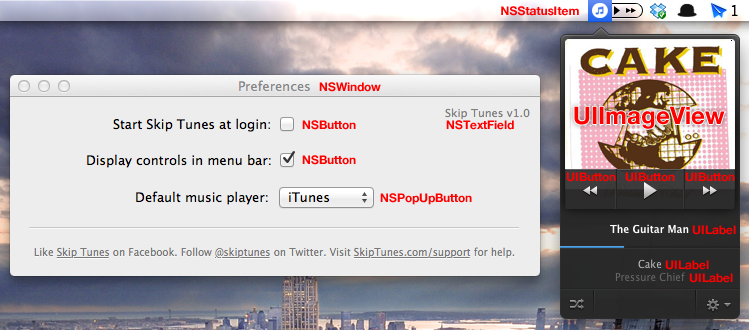
&lt;p&gt;I was able to write most of the Skip Tunes user interface
using &lt;code&gt;UIView&lt;/code&gt;, &lt;code&gt;UIButton&lt;/code&gt;, &lt;code&gt;UILabel&lt;/code&gt;, and even &lt;code&gt;UIViewController&lt;/code&gt; in addition to AppKit
classes like &lt;code&gt;NSStatusItem&lt;/code&gt; and &lt;code&gt;NSWorkspace&lt;/code&gt;.&lt;/p&gt;

&lt;p&gt;&lt;img width=&quot;749&quot; height=&quot;330&quot; src=&quot;/static/post_assets/2012-02-13-chameleon.png&quot; alt=&quot;&quot; /&gt;&lt;/p&gt;

&lt;p&gt;If I had to do it over again, I think I would still use Chameleon, although I think I would
try a bit harder to get AppKit to behave. I generally don&amp;rsquo;t like using cross-platform
toolkits, but in this case the result was good enough to make up for it.&lt;/p&gt;

&lt;h3 id=&quot;scripting-bridge&quot;&gt;Scripting Bridge&lt;/h3&gt;

&lt;p&gt;The job of actually controlling and inspecting the media players falls onto AppleScript.
Luckily, all three apps have similar scripting interfaces, so it wasn&amp;rsquo;t hard to create
an abstraction layer on top of them.&lt;/p&gt;

&lt;p&gt;Along the way, I learned a couple of neat tricks about Scriping Bridge, which is an API
for using AppleScript from Objective-C.&lt;/p&gt;

&lt;p&gt;To generate header files for each app, I used two command line tools: &lt;code&gt;sdef&lt;/code&gt; and &lt;code&gt;sdp&lt;/code&gt;.
Together, they take the scripting definition for an app and output an Objective-C &lt;code&gt;.h&lt;/code&gt;
file that you can include in your app. Here&amp;rsquo;s how I generated the header for iTunes:&lt;/p&gt;

&lt;pre&gt;&lt;code&gt;sdef /Applications/iTunes.app/ | sdp -fh --basename iTunes -o ~/Desktop/iTunes.h
&lt;/code&gt;&lt;/pre&gt;

&lt;p&gt;The &lt;code&gt;basename&lt;/code&gt; is used to generate some of the object names in that header file.
In the above example, the &lt;code&gt;iTunes.h&lt;/code&gt; file contains classes named &lt;code&gt;iTunesApplication&lt;/code&gt;,
&lt;code&gt;iTunesPlaylist&lt;/code&gt;, etc.&lt;/p&gt;

&lt;p&gt;I also learned that the &lt;code&gt;SBApplication&lt;/code&gt; object, which represents your app&amp;rsquo;s connection
to the scriptable app, can have a delegate that it reports errors to. This was
really helpful during development, because I could see where things were going wrong.&lt;/p&gt;

&lt;h3 id=&quot;distributed-notifications&quot;&gt;Distributed Notifications&lt;/h3&gt;

&lt;p&gt;If your app needs to respond to the behaviour of other apps, the way that Skip Tunes
needs to respond to the media player starting, stopping, or changing tracks, you
need to see if &lt;code&gt;NSDistributedNotificationCenter&lt;/code&gt; has the information you need.
Some apps will broadcast notifications over this channel about their state, which can
save your app from doing nasty polling.&lt;/p&gt;

&lt;p&gt;For example, whenever the state of playback changes, iTunes publishes a
&lt;code&gt;com.apple.iTunes.playerInfo&lt;/code&gt; notification on this notification center. Instead of
checking iTunes&amp;rsquo;s state over Scripting Bridge every second, I just register for
this notification and wait to hear back.&lt;/p&gt;

&lt;p&gt;If you go down this route, though, make sure to listen to &lt;code&gt;NSWorkspace&lt;/code&gt; notifications,
too, since opening and closing apps doesn&amp;rsquo;t usually send those state change notifications.&lt;/p&gt;

&lt;h2 id=&quot;go-get-it&quot;&gt;Go Get It!&lt;/h2&gt;

&lt;p&gt;You&amp;rsquo;re still here? Go &lt;a href=&quot;http://bit.ly/skip-tunes-app&quot;&gt;buy Skip Tunes&lt;/a&gt;, already!&lt;/p&gt;
</content>
 </entry>
 
 <entry>
   <title>2011 by the Numbers</title>
   <link href="http://justinvoss.com/2011/12/31/2011-by-the-numbers/"/>
   <updated>2011-12-31T00:00:00-06:00</updated>
   <id>http://justinvoss.com/2011/12/31/2011-by-the-numbers</id>
   <content type="html">&lt;p&gt;Visits to justinvoss.com: &lt;strong&gt;915&lt;/strong&gt;&lt;/p&gt;

&lt;p&gt;Tweets by &lt;a href=&quot;http://twitter.com/justinvoss&quot;&gt;@justinvoss&lt;/a&gt;: &lt;strong&gt;approx. 600&lt;/strong&gt;&lt;/p&gt;

&lt;p&gt;Visits to justinvoss.com from Reddit: &lt;strong&gt;374&lt;/strong&gt;&lt;/p&gt;

&lt;p&gt;Money made on the iOS App Store: &lt;strong&gt;$207.87&lt;/strong&gt;&lt;/p&gt;

&lt;p&gt;Albums on vinyl acquired: &lt;strong&gt;9&lt;/strong&gt;&lt;/p&gt;

&lt;p&gt;Books read in &lt;em&gt;The Dark Tower&lt;/em&gt; series: &lt;strong&gt;7&lt;/strong&gt;&lt;/p&gt;

&lt;p&gt;Video games completed: &lt;strong&gt;6&lt;/strong&gt;&lt;/p&gt;

&lt;ul&gt;
  &lt;li&gt;&lt;em&gt;Uncharted&lt;/em&gt; 1-3&lt;/li&gt;
  &lt;li&gt;&lt;em&gt;Portal 2&lt;/em&gt;&lt;/li&gt;
  &lt;li&gt;&lt;em&gt;Half-Life 2&lt;/em&gt; and &lt;em&gt;HL2: Episode 1&lt;/em&gt;&lt;/li&gt;
&lt;/ul&gt;

&lt;p&gt;Google Reader subscribers for justinvoss.com (including me): &lt;strong&gt;5&lt;/strong&gt;&lt;/p&gt;

&lt;p&gt;Apps released: &lt;strong&gt;4&lt;/strong&gt;&lt;/p&gt;

&lt;ul&gt;
  &lt;li&gt;May - &lt;a href=&quot;http://bit.ly/kowabunga-app&quot;&gt;Kowabunga&lt;/a&gt;&lt;/li&gt;
  &lt;li&gt;June - &lt;a href=&quot;http://bit.ly/herograph&quot;&gt;Herograph&lt;/a&gt;&lt;/li&gt;
  &lt;li&gt;September - &lt;a href=&quot;http://bit.ly/simple-desktops-app&quot;&gt;Simple Desktops&lt;/a&gt;&lt;/li&gt;
  &lt;li&gt;November - &lt;a href=&quot;http://bit.ly/carfax-reports-app&quot;&gt;CARFAX Reports&lt;/a&gt;&lt;/li&gt;
&lt;/ul&gt;

&lt;p&gt;Transmissions repaired: &lt;strong&gt;1&lt;/strong&gt; (&lt;a href=&quot;http://www.reddit.com/r/Assistance/comments/faeys/on_tuesday_i_paid_off_the_loan_on_my_car_on/&quot;&gt;details&lt;/a&gt;)&lt;/p&gt;

&lt;p&gt;Marriages: &lt;strong&gt;1&lt;/strong&gt; :)&lt;/p&gt;

</content>
 </entry>
 
 <entry>
   <title>Discover Django Servers with Bonjour</title>
   <link href="http://justinvoss.com/2011/12/12/discover-django-servers-with-bonjour/"/>
   <updated>2011-12-12T00:00:00-06:00</updated>
   <id>http://justinvoss.com/2011/12/12/discover-django-servers-with-bonjour</id>
   <content type="html">&lt;p&gt;Running a Django server that provides content to an iOS client is
a combination that&amp;rsquo;s worked great for the apps I&amp;rsquo;ve worked on.
Getting everything talking to each other is easy as long as both
processes are running on the same machine: just run the Django server
as usual, then run the iOS app in the simulator and point it to &lt;code&gt;localhost&lt;/code&gt;.&lt;/p&gt;

&lt;p&gt;Some iOS features, though, are hard to test in the simulator.
Barcode scanning, accelerometer tracking, and other hardware features 
can only be tested on a real device. But running the app on a device
means you can&amp;rsquo;t just say &lt;code&gt;localhost&lt;/code&gt; and expect to connect to your laptop;
you&amp;rsquo;ll need a way to reference your development machine without using the IP
address, which changes too often to be useful.&lt;/p&gt;

&lt;p&gt;This is exactly what &lt;a href=&quot;http://en.wikipedia.org/wiki/Bonjour_(software)&quot;&gt;Bonjour&lt;/a&gt; is for. Bonjour is Apple&amp;rsquo;s
implementation of &amp;ldquo;zero configuation networking,&amp;rdquo; which lets apps publish
and browse network services.&lt;/p&gt;

&lt;h2 id=&quot;finding-a-server-the-easy-way&quot;&gt;Finding a Server the Easy Way&lt;/h2&gt;

&lt;p&gt;Among other things, Bonjour gives your machine a hostname in the &lt;code&gt;.local&lt;/code&gt; 
domain, which stays constant even as your IP changes.&lt;/p&gt;

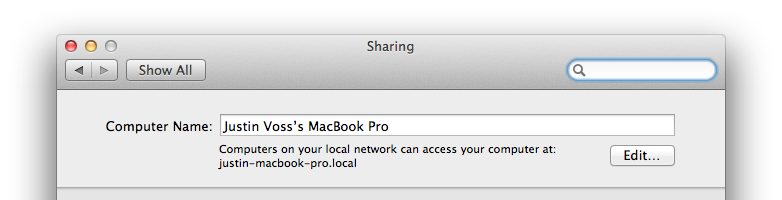
&lt;p&gt;You can find your machine&amp;rsquo;s Bonjour hostname in the Sharing pane of System Preferences. &lt;/p&gt;

&lt;p&gt;&lt;img src=&quot;/static/post_assets/2011-12-12-sharing.png&quot; alt=&quot;System Preferences - Sharing&quot; /&gt;&lt;/p&gt;

&lt;p&gt;You can see that my laptop goes by the name &lt;code&gt;justin-macbook-pro.local&lt;/code&gt;. In my iPhone app,
instead of connecting to &lt;code&gt;localhost:8000&lt;/code&gt;, I&amp;rsquo;ll instead connect to &lt;code&gt;justin-macbook-pro.local:8000&lt;/code&gt;.
There is no Step 2; it&amp;rsquo;s really that easy! No matter how many times my laptop changes
it&amp;rsquo;s IP address, that hostname will always resolve to the right machine. Now I can run
my iPhone app on a real device and it&amp;rsquo;s almost as easy as when everything was on localhost
(you do have to remember to tell Django to listen on all interfaces: just say
&lt;code&gt;manage.py runserver 0.0.0.0:8000&lt;/code&gt;).&lt;/p&gt;

&lt;p&gt;There&amp;rsquo;s an obvious downside, though: now my machine name is in the code. What if
I&amp;rsquo;m not the only developer on the project? Is everyone going to maintain their own
version of the configuration, with their own hostname in place of mine?
That would work, but it just feels &lt;em&gt;icky&lt;/em&gt;, to use a technical term.&lt;/p&gt;

&lt;p&gt;What if we didn&amp;rsquo;t have to hard-code anything at all, and the iPhone app
could discover the server totally automatically?&lt;/p&gt;

&lt;h2 id=&quot;finding-a-server-the-over-engineered-way&quot;&gt;Finding a Server the Over-Engineered Way&lt;/h2&gt;

&lt;p&gt;Let&amp;rsquo;s publish our Django server as a full-fledged Bonjour service, and
then write some iOS code to browse for it.&lt;/p&gt;

&lt;h3 id=&quot;publishing&quot;&gt;Publishing&lt;/h3&gt;

&lt;p&gt;Apple has some Objective-C APIs for publishing services, and there&amp;rsquo;s at least
one Python library that claims to do the same, but there&amp;rsquo;s an even easier way:
a commandline tool called &lt;code&gt;dns-sd&lt;/code&gt; (read the &lt;a href=&quot;http://developer.apple.com/library/mac/documentation/Darwin/Reference/Manpages/man1/dns-sd.1.html&quot;&gt;man page&lt;/a&gt; for details).
In a nutshell, invoking &lt;code&gt;dns-sd&lt;/code&gt; follows this format:&lt;/p&gt;

&lt;pre&gt;&lt;code&gt;dns-sd -R &amp;lt;name&amp;gt; &amp;lt;type&amp;gt; &amp;lt;domain&amp;gt; &amp;lt;port&amp;gt;
&lt;/code&gt;&lt;/pre&gt;

&lt;p&gt;Breaking it down a piece at a time:&lt;/p&gt;

&lt;ul&gt;
  &lt;li&gt;The &lt;code&gt;-R&lt;/code&gt; means we want to register (i.e., publish) a service.&lt;/li&gt;
  &lt;li&gt;The name should be a human-readable description of this instance of the service.
For example, an iTunes library uses a name like &amp;ldquo;Justin&amp;rsquo;s Library&amp;rdquo;.&lt;/li&gt;
  &lt;li&gt;The type is a Bonjour service type. This follows a format that puts the scheme
first and the network protocol second. For example, a web server is of the type
&lt;code&gt;_http._tcp&lt;/code&gt;. You can and should make up your own types, like &lt;code&gt;_myapp._tcp&lt;/code&gt;.&lt;/li&gt;
  &lt;li&gt;The domain is what Bonjour domain to publish this service to. In general,
you almost always want to use &lt;code&gt;local&lt;/code&gt;.&lt;/li&gt;
  &lt;li&gt;Finally, the port is what port your app is listening for connections on.
For Django, this is usually 8000.&lt;/li&gt;
&lt;/ul&gt;

&lt;p&gt;So, our hypothetical Django server would be published like so:&lt;/p&gt;

&lt;pre&gt;&lt;code&gt;dns-sd -R &quot;App API on Justin's MacBook&quot; _myapp._tcp local 8000
&lt;/code&gt;&lt;/pre&gt;

&lt;p&gt;To make life easier, I&amp;rsquo;ve written a Python script called &lt;a href=&quot;https://gist.github.com/1452921&quot;&gt;&lt;code&gt;runserver-bonjour&lt;/code&gt;&lt;/a&gt;
that will both run your Django project and publish it using Bonjour.&lt;/p&gt;

&lt;h3 id=&quot;side-note-bonjour-types&quot;&gt;Side Note: Bonjour Types&lt;/h3&gt;

&lt;p&gt;A Bonjour type, like &lt;code&gt;_http._tcp&lt;/code&gt;, is used to filter for specific services.
Unless you&amp;rsquo;re trying to be a drop-in replacement for something else, your app
should have it&amp;rsquo;s own unique type. In these examples, I&amp;rsquo;m using &lt;code&gt;_myapp._tcp&lt;/code&gt;.
There&amp;rsquo;s &lt;a href=&quot;http://www.dns-sd.org/ServiceTypes.html&quot;&gt;a list of all registered types&lt;/a&gt; that has lots of examples.&lt;/p&gt;

&lt;p&gt;You might be thinking, &amp;ldquo;Wait, aren&amp;rsquo;t we just an HTTP server? Why not use &lt;code&gt;_http._tcp&lt;/code&gt;?&amp;rdquo;
We don&amp;rsquo;t want to do that, because the fact that our service uses HTTP as a transport 
should be considered an implementation detail. The &lt;code&gt;_http._tcp&lt;/code&gt; type has a very specific use:
it&amp;rsquo;s for servers that deliver web pages intended to be displayed in a browser.
That&amp;rsquo;s not what our server does: it&amp;rsquo;s an API, not web pages, so that&amp;rsquo;s not the right type for us.&lt;/p&gt;

&lt;p&gt;To use a real example, when you enable iTunes music sharing, your copy of iTunes
starts up an embedded web server: the music sharing is actually done over HTTP.
But iTunes uses the Bonjour type &lt;code&gt;_daap._tcp&lt;/code&gt; to distinguish itself from other HTTP servers.
Your app should use the same strategy.&lt;/p&gt;

&lt;h3 id=&quot;browsing&quot;&gt;Browsing&lt;/h3&gt;

&lt;p&gt;Finding a Bonjour service isn&amp;rsquo;t too hard, but it does involve two layers
of delegation, which can make the code hard to follow. There are two phases:
in the first, we&amp;rsquo;ll browse for any services that match the type we want (&lt;code&gt;_myapp._tcp&lt;/code&gt;);
then, we&amp;rsquo;ll pick a single service and resolve it, which will tell us the hostname
and port to connect to.&lt;/p&gt;

&lt;p&gt;To browse for services, you need an &lt;code&gt;NSNetServiceBrowser&lt;/code&gt;. Give it a delegate,
then tell it what type of services you want (FYI, all these code samples are using ARC).&lt;/p&gt;

&lt;div class=&quot;highlight&quot;&gt;&lt;pre&gt;&lt;code class=&quot;objectivec&quot;&gt;&lt;span class=&quot;n&quot;&gt;self&lt;/span&gt;&lt;span class=&quot;p&quot;&gt;.&lt;/span&gt;&lt;span class=&quot;n&quot;&gt;serviceBrowser&lt;/span&gt; &lt;span class=&quot;o&quot;&gt;=&lt;/span&gt; &lt;span class=&quot;p&quot;&gt;[&lt;/span&gt;&lt;span class=&quot;n&quot;&gt;NSNetServiceBrowser&lt;/span&gt; &lt;span class=&quot;n&quot;&gt;new&lt;/span&gt;&lt;span class=&quot;p&quot;&gt;];&lt;/span&gt;
&lt;span class=&quot;n&quot;&gt;self&lt;/span&gt;&lt;span class=&quot;p&quot;&gt;.&lt;/span&gt;&lt;span class=&quot;n&quot;&gt;serviceBrowser&lt;/span&gt;&lt;span class=&quot;p&quot;&gt;.&lt;/span&gt;&lt;span class=&quot;n&quot;&gt;delegate&lt;/span&gt; &lt;span class=&quot;o&quot;&gt;=&lt;/span&gt; &lt;span class=&quot;n&quot;&gt;self&lt;/span&gt;&lt;span class=&quot;p&quot;&gt;;&lt;/span&gt;
&lt;span class=&quot;p&quot;&gt;[&lt;/span&gt;&lt;span class=&quot;n&quot;&gt;self&lt;/span&gt;&lt;span class=&quot;p&quot;&gt;.&lt;/span&gt;&lt;span class=&quot;n&quot;&gt;serviceBrowser&lt;/span&gt; &lt;span class=&quot;nl&quot;&gt;searchForServicesOfType:&lt;/span&gt;&lt;span class=&quot;s&quot;&gt;@&amp;quot;_myapp._tcp&amp;quot;&lt;/span&gt; &lt;span class=&quot;nl&quot;&gt;inDomain:&lt;/span&gt;&lt;span class=&quot;s&quot;&gt;@&amp;quot;&amp;quot;&lt;/span&gt;&lt;span class=&quot;p&quot;&gt;];&lt;/span&gt;
&lt;/code&gt;&lt;/pre&gt;
&lt;/div&gt;

&lt;p&gt;Passing in an empty string for the domain means you want the default domain, &lt;code&gt;local&lt;/code&gt;.&lt;/p&gt;

&lt;p&gt;As the service browser finds services, it notifies the delegate. It calls
the delegate once per service, so if you want to do something with the whole
collection of them, you need to maintain a list yourself.&lt;/p&gt;

&lt;div class=&quot;highlight&quot;&gt;&lt;pre&gt;&lt;code class=&quot;objectivec&quot;&gt;&lt;span class=&quot;o&quot;&gt;-&lt;/span&gt; &lt;span class=&quot;p&quot;&gt;(&lt;/span&gt;&lt;span class=&quot;kt&quot;&gt;void&lt;/span&gt;&lt;span class=&quot;p&quot;&gt;)&lt;/span&gt;&lt;span class=&quot;nl&quot;&gt;netServiceBrowser:&lt;/span&gt;&lt;span class=&quot;p&quot;&gt;(&lt;/span&gt;&lt;span class=&quot;n&quot;&gt;NSNetServiceBrowser&lt;/span&gt; &lt;span class=&quot;o&quot;&gt;*&lt;/span&gt;&lt;span class=&quot;p&quot;&gt;)&lt;/span&gt;&lt;span class=&quot;n&quot;&gt;aNetServiceBrowser&lt;/span&gt; 
           &lt;span class=&quot;nl&quot;&gt;didFindService:&lt;/span&gt;&lt;span class=&quot;p&quot;&gt;(&lt;/span&gt;&lt;span class=&quot;n&quot;&gt;NSNetService&lt;/span&gt; &lt;span class=&quot;o&quot;&gt;*&lt;/span&gt;&lt;span class=&quot;p&quot;&gt;)&lt;/span&gt;&lt;span class=&quot;n&quot;&gt;aNetService&lt;/span&gt; 
               &lt;span class=&quot;nl&quot;&gt;moreComing:&lt;/span&gt;&lt;span class=&quot;p&quot;&gt;(&lt;/span&gt;&lt;span class=&quot;kt&quot;&gt;BOOL&lt;/span&gt;&lt;span class=&quot;p&quot;&gt;)&lt;/span&gt;&lt;span class=&quot;n&quot;&gt;moreComing&lt;/span&gt;
&lt;span class=&quot;p&quot;&gt;{&lt;/span&gt;
    &lt;span class=&quot;c1&quot;&gt;// __foundServices is an NSMutableArray&lt;/span&gt;
    &lt;span class=&quot;p&quot;&gt;[&lt;/span&gt;&lt;span class=&quot;n&quot;&gt;__foundServices&lt;/span&gt; &lt;span class=&quot;nl&quot;&gt;addObject:&lt;/span&gt;&lt;span class=&quot;n&quot;&gt;aNetService&lt;/span&gt;&lt;span class=&quot;p&quot;&gt;];&lt;/span&gt;
    
    &lt;span class=&quot;k&quot;&gt;if&lt;/span&gt; &lt;span class=&quot;p&quot;&gt;(&lt;/span&gt;&lt;span class=&quot;o&quot;&gt;!&lt;/span&gt;&lt;span class=&quot;n&quot;&gt;moreComing&lt;/span&gt;&lt;span class=&quot;p&quot;&gt;)&lt;/span&gt; &lt;span class=&quot;p&quot;&gt;{&lt;/span&gt;
        &lt;span class=&quot;p&quot;&gt;[&lt;/span&gt;&lt;span class=&quot;n&quot;&gt;self&lt;/span&gt; &lt;span class=&quot;n&quot;&gt;resolveFirstService&lt;/span&gt;&lt;span class=&quot;p&quot;&gt;];&lt;/span&gt;
    &lt;span class=&quot;p&quot;&gt;}&lt;/span&gt;
&lt;span class=&quot;p&quot;&gt;}&lt;/span&gt;
&lt;/code&gt;&lt;/pre&gt;
&lt;/div&gt;

&lt;p&gt;The &lt;code&gt;moreComing&lt;/code&gt; parameter is a hint that there may or may not be more pending calls to this method.
Apple recommends using this flag to determine when to update your UI, but in this
case I&amp;rsquo;m using it to decide when to stop browsing and start resolving.&lt;/p&gt;

&lt;div class=&quot;highlight&quot;&gt;&lt;pre&gt;&lt;code class=&quot;objectivec&quot;&gt;&lt;span class=&quot;o&quot;&gt;-&lt;/span&gt; &lt;span class=&quot;p&quot;&gt;(&lt;/span&gt;&lt;span class=&quot;kt&quot;&gt;void&lt;/span&gt;&lt;span class=&quot;p&quot;&gt;)&lt;/span&gt;&lt;span class=&quot;n&quot;&gt;resolveFirstService&lt;/span&gt;
&lt;span class=&quot;p&quot;&gt;{&lt;/span&gt;
    &lt;span class=&quot;n&quot;&gt;NSNetService&lt;/span&gt; &lt;span class=&quot;o&quot;&gt;*&lt;/span&gt;&lt;span class=&quot;n&quot;&gt;service&lt;/span&gt; &lt;span class=&quot;o&quot;&gt;=&lt;/span&gt; &lt;span class=&quot;p&quot;&gt;[&lt;/span&gt;&lt;span class=&quot;n&quot;&gt;__foundServices&lt;/span&gt; &lt;span class=&quot;nl&quot;&gt;objectAtIndex:&lt;/span&gt;&lt;span class=&quot;mi&quot;&gt;0&lt;/span&gt;&lt;span class=&quot;p&quot;&gt;];&lt;/span&gt;
    &lt;span class=&quot;n&quot;&gt;service&lt;/span&gt;&lt;span class=&quot;p&quot;&gt;.&lt;/span&gt;&lt;span class=&quot;n&quot;&gt;delegate&lt;/span&gt; &lt;span class=&quot;o&quot;&gt;=&lt;/span&gt; &lt;span class=&quot;n&quot;&gt;self&lt;/span&gt;&lt;span class=&quot;p&quot;&gt;;&lt;/span&gt;
    &lt;span class=&quot;p&quot;&gt;[&lt;/span&gt;&lt;span class=&quot;n&quot;&gt;service&lt;/span&gt; &lt;span class=&quot;nl&quot;&gt;resolveWithTimeout:&lt;/span&gt;&lt;span class=&quot;mf&quot;&gt;10.0&lt;/span&gt;&lt;span class=&quot;p&quot;&gt;];&lt;/span&gt;
&lt;span class=&quot;p&quot;&gt;}&lt;/span&gt;
&lt;/code&gt;&lt;/pre&gt;
&lt;/div&gt;

&lt;p&gt;In some apps, you might want to let the user choose which service to use.
For our purposes, we can assume there&amp;rsquo;s usually only one service, so
we&amp;rsquo;ll just grab the first one and resolve it. This is where the second level
of delegation happens: the service needs a delegate to notify when it
finishes resolving.&lt;/p&gt;

&lt;div class=&quot;highlight&quot;&gt;&lt;pre&gt;&lt;code class=&quot;objectivec&quot;&gt;&lt;span class=&quot;o&quot;&gt;-&lt;/span&gt; &lt;span class=&quot;p&quot;&gt;(&lt;/span&gt;&lt;span class=&quot;kt&quot;&gt;void&lt;/span&gt;&lt;span class=&quot;p&quot;&gt;)&lt;/span&gt;&lt;span class=&quot;nl&quot;&gt;netServiceDidResolveAddress:&lt;/span&gt;&lt;span class=&quot;p&quot;&gt;(&lt;/span&gt;&lt;span class=&quot;n&quot;&gt;NSNetService&lt;/span&gt; &lt;span class=&quot;o&quot;&gt;*&lt;/span&gt;&lt;span class=&quot;p&quot;&gt;)&lt;/span&gt;&lt;span class=&quot;n&quot;&gt;sender&lt;/span&gt;
&lt;span class=&quot;p&quot;&gt;{&lt;/span&gt;
    &lt;span class=&quot;n&quot;&gt;NSLog&lt;/span&gt;&lt;span class=&quot;p&quot;&gt;(&lt;/span&gt;&lt;span class=&quot;s&quot;&gt;@&amp;quot;Resolved service with hostname=%@, port=%d&amp;quot;&lt;/span&gt;&lt;span class=&quot;p&quot;&gt;,&lt;/span&gt; &lt;span class=&quot;n&quot;&gt;sender&lt;/span&gt;&lt;span class=&quot;p&quot;&gt;.&lt;/span&gt;&lt;span class=&quot;n&quot;&gt;hostName&lt;/span&gt;&lt;span class=&quot;p&quot;&gt;,&lt;/span&gt; &lt;span class=&quot;n&quot;&gt;sender&lt;/span&gt;&lt;span class=&quot;p&quot;&gt;.&lt;/span&gt;&lt;span class=&quot;n&quot;&gt;port&lt;/span&gt;&lt;span class=&quot;p&quot;&gt;);&lt;/span&gt;
&lt;span class=&quot;p&quot;&gt;}&lt;/span&gt;
&lt;/code&gt;&lt;/pre&gt;
&lt;/div&gt;

&lt;p&gt;At this point, you have all the info you need to connect to this service.
I just take the hostname and port, slap them together with &lt;code&gt;+[NSString stringWithFormat:]&lt;/code&gt;,
then create an &lt;code&gt;NSURL&lt;/code&gt; from that.&lt;/p&gt;

&lt;p&gt;I put together a class to handle the details for me, called &lt;a href=&quot;https://gist.github.com/1465170&quot;&gt;&lt;code&gt;RBServerLocator&lt;/code&gt;&lt;/a&gt;
(The &lt;code&gt;RB&lt;/code&gt; prefix is to match &lt;code&gt;runserver-bonjour&lt;/code&gt;). Using it is as easy as specifying
the type and providing a completion block that takes a resolved service.
There&amp;rsquo;s even a category on &lt;code&gt;NSNetService&lt;/code&gt; to create an HTTP URL for you.&lt;/p&gt;

&lt;div class=&quot;highlight&quot;&gt;&lt;pre&gt;&lt;code class=&quot;objectivec&quot;&gt;&lt;span class=&quot;p&quot;&gt;[[&lt;/span&gt;&lt;span class=&quot;n&quot;&gt;RBServerLocator&lt;/span&gt; &lt;span class=&quot;n&quot;&gt;sharedLocator&lt;/span&gt;&lt;span class=&quot;p&quot;&gt;]&lt;/span&gt; &lt;span class=&quot;nl&quot;&gt;locateServerMatchingType:&lt;/span&gt;&lt;span class=&quot;s&quot;&gt;@&amp;quot;_myapp._tcp&amp;quot;&lt;/span&gt;
                                               &lt;span class=&quot;nl&quot;&gt;completion:&lt;/span&gt;&lt;span class=&quot;o&quot;&gt;^&lt;/span&gt;&lt;span class=&quot;p&quot;&gt;(&lt;/span&gt;&lt;span class=&quot;n&quot;&gt;NSNetService&lt;/span&gt; &lt;span class=&quot;o&quot;&gt;*&lt;/span&gt;&lt;span class=&quot;n&quot;&gt;service&lt;/span&gt;&lt;span class=&quot;p&quot;&gt;)&lt;/span&gt; &lt;span class=&quot;p&quot;&gt;{&lt;/span&gt;
                                                   &lt;span class=&quot;n&quot;&gt;NSLog&lt;/span&gt;&lt;span class=&quot;p&quot;&gt;(&lt;/span&gt;&lt;span class=&quot;s&quot;&gt;@&amp;quot;found server: %@&amp;quot;&lt;/span&gt;&lt;span class=&quot;p&quot;&gt;,&lt;/span&gt; &lt;span class=&quot;p&quot;&gt;[&lt;/span&gt;&lt;span class=&quot;n&quot;&gt;service&lt;/span&gt; &lt;span class=&quot;n&quot;&gt;RBResolvedURL&lt;/span&gt;&lt;span class=&quot;p&quot;&gt;]);&lt;/span&gt;
                                               &lt;span class=&quot;p&quot;&gt;}];&lt;/span&gt;
&lt;/code&gt;&lt;/pre&gt;
&lt;/div&gt;

&lt;h2 id=&quot;further-reading&quot;&gt;Further Reading&lt;/h2&gt;

&lt;p&gt;This short trip through Bonjour doesn&amp;rsquo;t nearly do it justice: it&amp;rsquo;s
a powerful toolkit for sharing and discovering other apps and devices.
Apple&amp;rsquo;s &lt;a href=&quot;http://developer.apple.com/library/mac/documentation/Cocoa/Conceptual/NetServices/Introduction.html&quot;&gt;Bonjour Overview&lt;/a&gt; can take you an a deep dive
into everything it has to offer.&lt;/p&gt;

</content>
 </entry>
 
 <entry>
   <title>Smoothing Data with Low-Pass Filters</title>
   <link href="http://justinvoss.com/2011/11/07/smoothing-data-with-low-pass-filters/"/>
   <updated>2011-11-07T00:00:00-06:00</updated>
   <id>http://justinvoss.com/2011/11/07/smoothing-data-with-low-pass-filters</id>
   <content type="html">&lt;p&gt;I should have paid more attention in my math classes.
There&amp;rsquo;s actually a lot of neat things you can do with a good working knowledge of math: 
I&amp;rsquo;ve started to go back over the material I should have learned in college and
I&amp;rsquo;m trying to apply it to programming.&lt;/p&gt;

&lt;p&gt;One handy trick is an algorithm called a &lt;a href=&quot;http://en.wikipedia.org/wiki/Low-pass_filter&quot;&gt;low-pass filter&lt;/a&gt;.
This basically takes a stream of data and filters out everything but the low-frequency signal.
Effectively, this &amp;ldquo;smooths&amp;rdquo; out the data by taking out the jittery, high-frequency noise.&lt;/p&gt;

&lt;p&gt;Like I said before, my math skills are weak, but looking at the algorithmic implementation on
Wikipedia it seems like it&amp;rsquo;s basically a weighted average: some of the data is from the previously
filtered value, and some of the data is from the raw stream.
Here&amp;rsquo;s my breakdown of what each piece means:&lt;/p&gt;

&lt;ul&gt;
  &lt;li&gt;The &lt;code&gt;alpha&lt;/code&gt; value determines exactly how much weight to give the previous data vs the raw data.&lt;/li&gt;
  &lt;li&gt;The &lt;code&gt;dt&lt;/code&gt; is how much time elapsed between samples.&lt;/li&gt;
  &lt;li&gt;I don&amp;rsquo;t totally understand what the &lt;code&gt;RC&lt;/code&gt; value is for, but by playing with it&amp;rsquo;s value it&amp;rsquo;s possible to control the aggressiveness of the filter:
bigger values mean smoother output.&lt;/li&gt;
&lt;/ul&gt;

&lt;h2 id=&quot;demo-time-fun-with-the-accelerometer&quot;&gt;Demo Time: Fun with the Accelerometer&lt;/h2&gt;

&lt;p&gt;So, how can we apply this to something useful?&lt;/p&gt;

&lt;p&gt;If you haven&amp;rsquo;t already seen &lt;a href=&quot;https://github.com/404&quot;&gt;GitHub&amp;rsquo;s 404 page&lt;/a&gt;, go take a look:
make sure you move your mouse around the page.
See how the images move around in parallax? 
If you visit the same page on your smartphone, it can even use the accelerometer
in your device to make the images move.&lt;/p&gt;

&lt;p&gt;I thought it would be neat to replicate the effect in a native iOS app.
Grabbing data from the accelerometer and shifting the views around is pretty
easy, but the result is poor.
The accelerometer is way too sensitive to small movements, and it makes the app
feel over-caffeinated.&lt;/p&gt;

&lt;p&gt;Low-pass filtering to the rescue!&lt;/p&gt;

&lt;p&gt;Here&amp;rsquo;s a before-and-after video. Each version of the app is using the same recorded
accelerometer data, running in a 10-second loop. The version on the left is using
the raw data, while the version on the right is using data run through a low-pass filter.&lt;/p&gt;

&lt;p&gt;The results should speak for themselves: the filtered data is a little slower to react,
but moves smoothly and deliberately. The raw data jumps and twitches too much for comfort.&lt;/p&gt;

&lt;iframe src=&quot;http://player.vimeo.com/video/31734175?portrait=0&quot; width=&quot;751&quot; height=&quot;563&quot; frameborder=&quot;0&quot; webkitAllowFullScreen=&quot;true&quot; allowFullScreen=&quot;true&quot;&gt; &lt;/iframe&gt;

&lt;h2 id=&quot;show-me-the-code&quot;&gt;Show Me the Code!&lt;/h2&gt;

&lt;p&gt;First things first, let&amp;rsquo;s get some accelerometer data.
I put this in my view controller&amp;rsquo;s &lt;code&gt;viewWillAppear:&lt;/code&gt; method.&lt;/p&gt;

&lt;div class=&quot;highlight&quot;&gt;&lt;pre&gt;&lt;code class=&quot;objectivec&quot;&gt;&lt;span class=&quot;n&quot;&gt;NSOperationQueue&lt;/span&gt; &lt;span class=&quot;o&quot;&gt;*&lt;/span&gt;&lt;span class=&quot;n&quot;&gt;accelerometerQueue&lt;/span&gt; &lt;span class=&quot;o&quot;&gt;=&lt;/span&gt; &lt;span class=&quot;p&quot;&gt;[&lt;/span&gt;&lt;span class=&quot;n&quot;&gt;NSOperationQueue&lt;/span&gt; &lt;span class=&quot;n&quot;&gt;mainQueue&lt;/span&gt;&lt;span class=&quot;p&quot;&gt;];&lt;/span&gt;
&lt;span class=&quot;n&quot;&gt;self&lt;/span&gt;&lt;span class=&quot;p&quot;&gt;.&lt;/span&gt;&lt;span class=&quot;n&quot;&gt;motionManager&lt;/span&gt; &lt;span class=&quot;o&quot;&gt;=&lt;/span&gt; &lt;span class=&quot;p&quot;&gt;[[&lt;/span&gt;&lt;span class=&quot;n&quot;&gt;CMMotionManager&lt;/span&gt; &lt;span class=&quot;n&quot;&gt;alloc&lt;/span&gt;&lt;span class=&quot;p&quot;&gt;]&lt;/span&gt; &lt;span class=&quot;n&quot;&gt;init&lt;/span&gt;&lt;span class=&quot;p&quot;&gt;];&lt;/span&gt;
&lt;span class=&quot;p&quot;&gt;[&lt;/span&gt;&lt;span class=&quot;n&quot;&gt;self&lt;/span&gt;&lt;span class=&quot;p&quot;&gt;.&lt;/span&gt;&lt;span class=&quot;n&quot;&gt;motionManager&lt;/span&gt; &lt;span class=&quot;nl&quot;&gt;setAccelerometerUpdateInterval:&lt;/span&gt;&lt;span class=&quot;p&quot;&gt;(&lt;/span&gt;&lt;span class=&quot;mf&quot;&gt;1.0&lt;/span&gt; &lt;span class=&quot;o&quot;&gt;/&lt;/span&gt; &lt;span class=&quot;mi&quot;&gt;20&lt;/span&gt;&lt;span class=&quot;p&quot;&gt;)];&lt;/span&gt;
&lt;span class=&quot;p&quot;&gt;[&lt;/span&gt;&lt;span class=&quot;n&quot;&gt;self&lt;/span&gt;&lt;span class=&quot;p&quot;&gt;.&lt;/span&gt;&lt;span class=&quot;n&quot;&gt;motionManager&lt;/span&gt; &lt;span class=&quot;nl&quot;&gt;startAccelerometerUpdatesToQueue:&lt;/span&gt;&lt;span class=&quot;n&quot;&gt;accelerometerQueue&lt;/span&gt; &lt;span class=&quot;nl&quot;&gt;withHandler:&lt;/span&gt;&lt;span class=&quot;o&quot;&gt;^&lt;/span&gt;&lt;span class=&quot;p&quot;&gt;(&lt;/span&gt;&lt;span class=&quot;n&quot;&gt;CMAccelerometerData&lt;/span&gt; &lt;span class=&quot;o&quot;&gt;*&lt;/span&gt;&lt;span class=&quot;n&quot;&gt;data&lt;/span&gt;&lt;span class=&quot;p&quot;&gt;,&lt;/span&gt; &lt;span class=&quot;n&quot;&gt;NSError&lt;/span&gt; &lt;span class=&quot;o&quot;&gt;*&lt;/span&gt;&lt;span class=&quot;n&quot;&gt;error&lt;/span&gt;&lt;span class=&quot;p&quot;&gt;)&lt;/span&gt; &lt;span class=&quot;p&quot;&gt;{&lt;/span&gt;
    &lt;span class=&quot;p&quot;&gt;[&lt;/span&gt;&lt;span class=&quot;n&quot;&gt;self&lt;/span&gt; &lt;span class=&quot;nl&quot;&gt;updateViewsWithFilteredAcceleration:&lt;/span&gt;&lt;span class=&quot;n&quot;&gt;data&lt;/span&gt;&lt;span class=&quot;p&quot;&gt;.&lt;/span&gt;&lt;span class=&quot;n&quot;&gt;acceleration&lt;/span&gt;&lt;span class=&quot;p&quot;&gt;];&lt;/span&gt;
&lt;span class=&quot;p&quot;&gt;}];&lt;/span&gt;
&lt;/code&gt;&lt;/pre&gt;
&lt;/div&gt;

&lt;p&gt;The &lt;code&gt;updateViewsWithFilteredAcceleration:&lt;/code&gt; does the actual filtering.&lt;/p&gt;

&lt;div class=&quot;highlight&quot;&gt;&lt;pre&gt;&lt;code class=&quot;objectivec&quot;&gt;&lt;span class=&quot;o&quot;&gt;-&lt;/span&gt; &lt;span class=&quot;p&quot;&gt;(&lt;/span&gt;&lt;span class=&quot;kt&quot;&gt;void&lt;/span&gt;&lt;span class=&quot;p&quot;&gt;)&lt;/span&gt;&lt;span class=&quot;nl&quot;&gt;updateViewsWithFilteredAcceleration:&lt;/span&gt;&lt;span class=&quot;p&quot;&gt;(&lt;/span&gt;&lt;span class=&quot;n&quot;&gt;CMAcceleration&lt;/span&gt;&lt;span class=&quot;p&quot;&gt;)&lt;/span&gt;&lt;span class=&quot;n&quot;&gt;acceleration&lt;/span&gt;
&lt;span class=&quot;p&quot;&gt;{&lt;/span&gt;
    &lt;span class=&quot;k&quot;&gt;static&lt;/span&gt; &lt;span class=&quot;n&quot;&gt;CGFloat&lt;/span&gt; &lt;span class=&quot;n&quot;&gt;x0&lt;/span&gt; &lt;span class=&quot;o&quot;&gt;=&lt;/span&gt; &lt;span class=&quot;mi&quot;&gt;0&lt;/span&gt;&lt;span class=&quot;p&quot;&gt;;&lt;/span&gt;
    &lt;span class=&quot;k&quot;&gt;static&lt;/span&gt; &lt;span class=&quot;n&quot;&gt;CGFloat&lt;/span&gt; &lt;span class=&quot;n&quot;&gt;y0&lt;/span&gt; &lt;span class=&quot;o&quot;&gt;=&lt;/span&gt; &lt;span class=&quot;mi&quot;&gt;0&lt;/span&gt;&lt;span class=&quot;p&quot;&gt;;&lt;/span&gt;
    
    &lt;span class=&quot;k&quot;&gt;const&lt;/span&gt; &lt;span class=&quot;n&quot;&gt;NSTimeInterval&lt;/span&gt; &lt;span class=&quot;n&quot;&gt;dt&lt;/span&gt; &lt;span class=&quot;o&quot;&gt;=&lt;/span&gt; &lt;span class=&quot;p&quot;&gt;(&lt;/span&gt;&lt;span class=&quot;mf&quot;&gt;1.0&lt;/span&gt; &lt;span class=&quot;o&quot;&gt;/&lt;/span&gt; &lt;span class=&quot;mi&quot;&gt;20&lt;/span&gt;&lt;span class=&quot;p&quot;&gt;);&lt;/span&gt;
    &lt;span class=&quot;k&quot;&gt;const&lt;/span&gt; &lt;span class=&quot;kt&quot;&gt;double&lt;/span&gt; &lt;span class=&quot;n&quot;&gt;RC&lt;/span&gt; &lt;span class=&quot;o&quot;&gt;=&lt;/span&gt; &lt;span class=&quot;mf&quot;&gt;0.3&lt;/span&gt;&lt;span class=&quot;p&quot;&gt;;&lt;/span&gt;
    &lt;span class=&quot;k&quot;&gt;const&lt;/span&gt; &lt;span class=&quot;kt&quot;&gt;double&lt;/span&gt; &lt;span class=&quot;n&quot;&gt;alpha&lt;/span&gt; &lt;span class=&quot;o&quot;&gt;=&lt;/span&gt; &lt;span class=&quot;n&quot;&gt;dt&lt;/span&gt; &lt;span class=&quot;o&quot;&gt;/&lt;/span&gt; &lt;span class=&quot;p&quot;&gt;(&lt;/span&gt;&lt;span class=&quot;n&quot;&gt;RC&lt;/span&gt; &lt;span class=&quot;o&quot;&gt;+&lt;/span&gt; &lt;span class=&quot;n&quot;&gt;dt&lt;/span&gt;&lt;span class=&quot;p&quot;&gt;);&lt;/span&gt;
    
    &lt;span class=&quot;n&quot;&gt;CMAcceleration&lt;/span&gt; &lt;span class=&quot;n&quot;&gt;smoothed&lt;/span&gt;&lt;span class=&quot;p&quot;&gt;;&lt;/span&gt;
    &lt;span class=&quot;n&quot;&gt;smoothed&lt;/span&gt;&lt;span class=&quot;p&quot;&gt;.&lt;/span&gt;&lt;span class=&quot;n&quot;&gt;x&lt;/span&gt; &lt;span class=&quot;o&quot;&gt;=&lt;/span&gt; &lt;span class=&quot;p&quot;&gt;(&lt;/span&gt;&lt;span class=&quot;n&quot;&gt;alpha&lt;/span&gt; &lt;span class=&quot;o&quot;&gt;*&lt;/span&gt; &lt;span class=&quot;n&quot;&gt;acceleration&lt;/span&gt;&lt;span class=&quot;p&quot;&gt;.&lt;/span&gt;&lt;span class=&quot;n&quot;&gt;x&lt;/span&gt;&lt;span class=&quot;p&quot;&gt;)&lt;/span&gt; &lt;span class=&quot;o&quot;&gt;+&lt;/span&gt; &lt;span class=&quot;p&quot;&gt;(&lt;/span&gt;&lt;span class=&quot;mf&quot;&gt;1.0&lt;/span&gt; &lt;span class=&quot;o&quot;&gt;-&lt;/span&gt; &lt;span class=&quot;n&quot;&gt;alpha&lt;/span&gt;&lt;span class=&quot;p&quot;&gt;)&lt;/span&gt; &lt;span class=&quot;o&quot;&gt;*&lt;/span&gt; &lt;span class=&quot;n&quot;&gt;x0&lt;/span&gt;&lt;span class=&quot;p&quot;&gt;;&lt;/span&gt;
    &lt;span class=&quot;n&quot;&gt;smoothed&lt;/span&gt;&lt;span class=&quot;p&quot;&gt;.&lt;/span&gt;&lt;span class=&quot;n&quot;&gt;y&lt;/span&gt; &lt;span class=&quot;o&quot;&gt;=&lt;/span&gt; &lt;span class=&quot;p&quot;&gt;(&lt;/span&gt;&lt;span class=&quot;n&quot;&gt;alpha&lt;/span&gt; &lt;span class=&quot;o&quot;&gt;*&lt;/span&gt; &lt;span class=&quot;n&quot;&gt;acceleration&lt;/span&gt;&lt;span class=&quot;p&quot;&gt;.&lt;/span&gt;&lt;span class=&quot;n&quot;&gt;y&lt;/span&gt;&lt;span class=&quot;p&quot;&gt;)&lt;/span&gt; &lt;span class=&quot;o&quot;&gt;+&lt;/span&gt; &lt;span class=&quot;p&quot;&gt;(&lt;/span&gt;&lt;span class=&quot;mf&quot;&gt;1.0&lt;/span&gt; &lt;span class=&quot;o&quot;&gt;-&lt;/span&gt; &lt;span class=&quot;n&quot;&gt;alpha&lt;/span&gt;&lt;span class=&quot;p&quot;&gt;)&lt;/span&gt; &lt;span class=&quot;o&quot;&gt;*&lt;/span&gt; &lt;span class=&quot;n&quot;&gt;y0&lt;/span&gt;&lt;span class=&quot;p&quot;&gt;;&lt;/span&gt;
    
    &lt;span class=&quot;p&quot;&gt;[&lt;/span&gt;&lt;span class=&quot;n&quot;&gt;self&lt;/span&gt; &lt;span class=&quot;nl&quot;&gt;updateViewsWithAcceleration:&lt;/span&gt;&lt;span class=&quot;n&quot;&gt;smoothed&lt;/span&gt;&lt;span class=&quot;p&quot;&gt;];&lt;/span&gt;
    
    &lt;span class=&quot;n&quot;&gt;x0&lt;/span&gt; &lt;span class=&quot;o&quot;&gt;=&lt;/span&gt; &lt;span class=&quot;n&quot;&gt;smoothed&lt;/span&gt;&lt;span class=&quot;p&quot;&gt;.&lt;/span&gt;&lt;span class=&quot;n&quot;&gt;x&lt;/span&gt;&lt;span class=&quot;p&quot;&gt;;&lt;/span&gt;
    &lt;span class=&quot;n&quot;&gt;y0&lt;/span&gt; &lt;span class=&quot;o&quot;&gt;=&lt;/span&gt; &lt;span class=&quot;n&quot;&gt;smoothed&lt;/span&gt;&lt;span class=&quot;p&quot;&gt;.&lt;/span&gt;&lt;span class=&quot;n&quot;&gt;y&lt;/span&gt;&lt;span class=&quot;p&quot;&gt;;&lt;/span&gt;
&lt;span class=&quot;p&quot;&gt;}&lt;/span&gt;
&lt;/code&gt;&lt;/pre&gt;
&lt;/div&gt;

&lt;p&gt;And finally, the &lt;code&gt;updateViewsWithAcceleration:&lt;/code&gt; method actually moves the center points of the views.&lt;/p&gt;

&lt;div class=&quot;highlight&quot;&gt;&lt;pre&gt;&lt;code class=&quot;objectivec&quot;&gt;&lt;span class=&quot;o&quot;&gt;-&lt;/span&gt; &lt;span class=&quot;p&quot;&gt;(&lt;/span&gt;&lt;span class=&quot;kt&quot;&gt;void&lt;/span&gt;&lt;span class=&quot;p&quot;&gt;)&lt;/span&gt;&lt;span class=&quot;nl&quot;&gt;updateViewsWithAcceleration:&lt;/span&gt;&lt;span class=&quot;p&quot;&gt;(&lt;/span&gt;&lt;span class=&quot;n&quot;&gt;CMAcceleration&lt;/span&gt;&lt;span class=&quot;p&quot;&gt;)&lt;/span&gt;&lt;span class=&quot;n&quot;&gt;acceleration&lt;/span&gt;&lt;span class=&quot;p&quot;&gt;;&lt;/span&gt;
&lt;span class=&quot;p&quot;&gt;{&lt;/span&gt;
    &lt;span class=&quot;n&quot;&gt;CGPoint&lt;/span&gt; &lt;span class=&quot;n&quot;&gt;center&lt;/span&gt; &lt;span class=&quot;o&quot;&gt;=&lt;/span&gt; &lt;span class=&quot;n&quot;&gt;self&lt;/span&gt;&lt;span class=&quot;p&quot;&gt;.&lt;/span&gt;&lt;span class=&quot;n&quot;&gt;view&lt;/span&gt;&lt;span class=&quot;p&quot;&gt;.&lt;/span&gt;&lt;span class=&quot;n&quot;&gt;center&lt;/span&gt;&lt;span class=&quot;p&quot;&gt;;&lt;/span&gt;
    &lt;span class=&quot;k&quot;&gt;const&lt;/span&gt; &lt;span class=&quot;n&quot;&gt;CGFloat&lt;/span&gt; &lt;span class=&quot;n&quot;&gt;maxOffset&lt;/span&gt; &lt;span class=&quot;o&quot;&gt;=&lt;/span&gt; &lt;span class=&quot;mi&quot;&gt;200&lt;/span&gt;&lt;span class=&quot;p&quot;&gt;;&lt;/span&gt;
    
    &lt;span class=&quot;n&quot;&gt;CGPoint&lt;/span&gt; &lt;span class=&quot;n&quot;&gt;frontCenter&lt;/span&gt;  &lt;span class=&quot;o&quot;&gt;=&lt;/span&gt; &lt;span class=&quot;n&quot;&gt;CGPointMake&lt;/span&gt;&lt;span class=&quot;p&quot;&gt;(&lt;/span&gt;&lt;span class=&quot;n&quot;&gt;center&lt;/span&gt;&lt;span class=&quot;p&quot;&gt;.&lt;/span&gt;&lt;span class=&quot;n&quot;&gt;x&lt;/span&gt; &lt;span class=&quot;o&quot;&gt;-&lt;/span&gt; &lt;span class=&quot;p&quot;&gt;(&lt;/span&gt;&lt;span class=&quot;o&quot;&gt;+&lt;/span&gt;&lt;span class=&quot;mf&quot;&gt;1.0&lt;/span&gt; &lt;span class=&quot;o&quot;&gt;*&lt;/span&gt; &lt;span class=&quot;n&quot;&gt;maxOffset&lt;/span&gt; &lt;span class=&quot;o&quot;&gt;*&lt;/span&gt; &lt;span class=&quot;n&quot;&gt;acceleration&lt;/span&gt;&lt;span class=&quot;p&quot;&gt;.&lt;/span&gt;&lt;span class=&quot;n&quot;&gt;x&lt;/span&gt;&lt;span class=&quot;p&quot;&gt;),&lt;/span&gt;
                                       &lt;span class=&quot;n&quot;&gt;center&lt;/span&gt;&lt;span class=&quot;p&quot;&gt;.&lt;/span&gt;&lt;span class=&quot;n&quot;&gt;y&lt;/span&gt; &lt;span class=&quot;o&quot;&gt;+&lt;/span&gt; &lt;span class=&quot;p&quot;&gt;(&lt;/span&gt;&lt;span class=&quot;o&quot;&gt;+&lt;/span&gt;&lt;span class=&quot;mf&quot;&gt;1.0&lt;/span&gt; &lt;span class=&quot;o&quot;&gt;*&lt;/span&gt; &lt;span class=&quot;n&quot;&gt;maxOffset&lt;/span&gt; &lt;span class=&quot;o&quot;&gt;*&lt;/span&gt; &lt;span class=&quot;n&quot;&gt;acceleration&lt;/span&gt;&lt;span class=&quot;p&quot;&gt;.&lt;/span&gt;&lt;span class=&quot;n&quot;&gt;y&lt;/span&gt;&lt;span class=&quot;p&quot;&gt;));&lt;/span&gt;

    &lt;span class=&quot;n&quot;&gt;CGPoint&lt;/span&gt; &lt;span class=&quot;n&quot;&gt;middleCenter&lt;/span&gt; &lt;span class=&quot;o&quot;&gt;=&lt;/span&gt; &lt;span class=&quot;n&quot;&gt;CGPointMake&lt;/span&gt;&lt;span class=&quot;p&quot;&gt;(&lt;/span&gt;&lt;span class=&quot;n&quot;&gt;center&lt;/span&gt;&lt;span class=&quot;p&quot;&gt;.&lt;/span&gt;&lt;span class=&quot;n&quot;&gt;x&lt;/span&gt; &lt;span class=&quot;o&quot;&gt;-&lt;/span&gt; &lt;span class=&quot;p&quot;&gt;(&lt;/span&gt;&lt;span class=&quot;o&quot;&gt;+&lt;/span&gt;&lt;span class=&quot;mf&quot;&gt;0.2&lt;/span&gt; &lt;span class=&quot;o&quot;&gt;*&lt;/span&gt; &lt;span class=&quot;n&quot;&gt;maxOffset&lt;/span&gt; &lt;span class=&quot;o&quot;&gt;*&lt;/span&gt; &lt;span class=&quot;n&quot;&gt;acceleration&lt;/span&gt;&lt;span class=&quot;p&quot;&gt;.&lt;/span&gt;&lt;span class=&quot;n&quot;&gt;x&lt;/span&gt;&lt;span class=&quot;p&quot;&gt;),&lt;/span&gt;
                                       &lt;span class=&quot;n&quot;&gt;center&lt;/span&gt;&lt;span class=&quot;p&quot;&gt;.&lt;/span&gt;&lt;span class=&quot;n&quot;&gt;y&lt;/span&gt; &lt;span class=&quot;o&quot;&gt;+&lt;/span&gt; &lt;span class=&quot;p&quot;&gt;(&lt;/span&gt;&lt;span class=&quot;o&quot;&gt;+&lt;/span&gt;&lt;span class=&quot;mf&quot;&gt;0.2&lt;/span&gt; &lt;span class=&quot;o&quot;&gt;*&lt;/span&gt; &lt;span class=&quot;n&quot;&gt;maxOffset&lt;/span&gt; &lt;span class=&quot;o&quot;&gt;*&lt;/span&gt; &lt;span class=&quot;n&quot;&gt;acceleration&lt;/span&gt;&lt;span class=&quot;p&quot;&gt;.&lt;/span&gt;&lt;span class=&quot;n&quot;&gt;y&lt;/span&gt;&lt;span class=&quot;p&quot;&gt;));&lt;/span&gt;
    
    &lt;span class=&quot;n&quot;&gt;CGPoint&lt;/span&gt; &lt;span class=&quot;n&quot;&gt;backCenter&lt;/span&gt;   &lt;span class=&quot;o&quot;&gt;=&lt;/span&gt; &lt;span class=&quot;n&quot;&gt;CGPointMake&lt;/span&gt;&lt;span class=&quot;p&quot;&gt;(&lt;/span&gt;&lt;span class=&quot;n&quot;&gt;center&lt;/span&gt;&lt;span class=&quot;p&quot;&gt;.&lt;/span&gt;&lt;span class=&quot;n&quot;&gt;x&lt;/span&gt; &lt;span class=&quot;o&quot;&gt;-&lt;/span&gt; &lt;span class=&quot;p&quot;&gt;(&lt;/span&gt;&lt;span class=&quot;o&quot;&gt;-&lt;/span&gt;&lt;span class=&quot;mf&quot;&gt;1.0&lt;/span&gt; &lt;span class=&quot;o&quot;&gt;*&lt;/span&gt; &lt;span class=&quot;n&quot;&gt;maxOffset&lt;/span&gt; &lt;span class=&quot;o&quot;&gt;*&lt;/span&gt; &lt;span class=&quot;n&quot;&gt;acceleration&lt;/span&gt;&lt;span class=&quot;p&quot;&gt;.&lt;/span&gt;&lt;span class=&quot;n&quot;&gt;x&lt;/span&gt;&lt;span class=&quot;p&quot;&gt;),&lt;/span&gt;
                                       &lt;span class=&quot;n&quot;&gt;center&lt;/span&gt;&lt;span class=&quot;p&quot;&gt;.&lt;/span&gt;&lt;span class=&quot;n&quot;&gt;y&lt;/span&gt; &lt;span class=&quot;o&quot;&gt;+&lt;/span&gt; &lt;span class=&quot;p&quot;&gt;(&lt;/span&gt;&lt;span class=&quot;o&quot;&gt;-&lt;/span&gt;&lt;span class=&quot;mf&quot;&gt;1.0&lt;/span&gt; &lt;span class=&quot;o&quot;&gt;*&lt;/span&gt; &lt;span class=&quot;n&quot;&gt;maxOffset&lt;/span&gt; &lt;span class=&quot;o&quot;&gt;*&lt;/span&gt; &lt;span class=&quot;n&quot;&gt;acceleration&lt;/span&gt;&lt;span class=&quot;p&quot;&gt;.&lt;/span&gt;&lt;span class=&quot;n&quot;&gt;y&lt;/span&gt;&lt;span class=&quot;p&quot;&gt;));&lt;/span&gt;    
    
    &lt;span class=&quot;n&quot;&gt;self&lt;/span&gt;&lt;span class=&quot;p&quot;&gt;.&lt;/span&gt;&lt;span class=&quot;n&quot;&gt;frontView&lt;/span&gt;&lt;span class=&quot;p&quot;&gt;.&lt;/span&gt;&lt;span class=&quot;n&quot;&gt;center&lt;/span&gt; &lt;span class=&quot;o&quot;&gt;=&lt;/span&gt; &lt;span class=&quot;n&quot;&gt;frontCenter&lt;/span&gt;&lt;span class=&quot;p&quot;&gt;;&lt;/span&gt;
    &lt;span class=&quot;n&quot;&gt;self&lt;/span&gt;&lt;span class=&quot;p&quot;&gt;.&lt;/span&gt;&lt;span class=&quot;n&quot;&gt;middleView&lt;/span&gt;&lt;span class=&quot;p&quot;&gt;.&lt;/span&gt;&lt;span class=&quot;n&quot;&gt;center&lt;/span&gt; &lt;span class=&quot;o&quot;&gt;=&lt;/span&gt; &lt;span class=&quot;n&quot;&gt;middleCenter&lt;/span&gt;&lt;span class=&quot;p&quot;&gt;;&lt;/span&gt;
    &lt;span class=&quot;n&quot;&gt;self&lt;/span&gt;&lt;span class=&quot;p&quot;&gt;.&lt;/span&gt;&lt;span class=&quot;n&quot;&gt;backView&lt;/span&gt;&lt;span class=&quot;p&quot;&gt;.&lt;/span&gt;&lt;span class=&quot;n&quot;&gt;center&lt;/span&gt; &lt;span class=&quot;o&quot;&gt;=&lt;/span&gt; &lt;span class=&quot;n&quot;&gt;backCenter&lt;/span&gt;&lt;span class=&quot;p&quot;&gt;;&lt;/span&gt;
&lt;span class=&quot;p&quot;&gt;}&lt;/span&gt;
&lt;/code&gt;&lt;/pre&gt;
&lt;/div&gt;

&lt;p&gt;Pretty simple, right? The math isn&amp;rsquo;t that bad, and it gives us a great result.
This is just a small example of what real math can do for your app.
In the next few months, I&amp;rsquo;ll try to do some more posts about using advanced math
and statistics to make more intelligent systems.&lt;/p&gt;

&lt;p&gt;If anyone&amp;rsquo;s interested, I can do a follow-up post about how I recorded the accelerometer for playback later.&lt;/p&gt;

</content>
 </entry>
 
 <entry>
   <title>Custom UIFont Gotchas</title>
   <link href="http://justinvoss.com/2011/09/23/custom-uifont-gotchas/"/>
   <updated>2011-09-23T00:00:00-05:00</updated>
   <id>http://justinvoss.com/2011/09/23/custom-uifont-gotchas</id>
   <content type="html">&lt;p&gt;Custom fonts are fun! Getting custom fonts to work with &lt;code&gt;UIFont&lt;/code&gt; isn&amp;rsquo;t always as much fun.
The tricky part that gets me every time is getting the font name right: it has little or
nothing to do with the filename of the font. How am I supposed to figure out what name to use?!
It turns out the developers at Apple are way ahead of me: the easiest way to get the 
name right it just ask the &lt;code&gt;UIFont&lt;/code&gt; class what names it knows.&lt;/p&gt;

&lt;p&gt;Thanks to &lt;a href=&quot;http://richardwarrender.com/2010/08/custom-fonts-on-ipad-and-iphone/&quot;&gt;Richard Warrender&amp;rsquo;s article about custom fonts on iOS&lt;/a&gt;, I discovered the
awesome &lt;code&gt;+[UIFont familyNames]&lt;/code&gt; and &lt;code&gt;+[UIFont fontNamesForFamilyName:]&lt;/code&gt; methods. The first
returns a list of every font family the system recognizes. The second takes one of those family
names and returns a list of font names associated with it. The font name is the one you should
give to &lt;code&gt;+[UIFont fontWithName:size:]&lt;/code&gt; to get your custom font.&lt;/p&gt;

&lt;p&gt;You still have to do the regular &amp;ldquo;add your font file to the project and specify it in your
&lt;code&gt;Info.plist&lt;/code&gt;&amp;rdquo; dance, but that&amp;rsquo;s not the hard part.&lt;/p&gt;

&lt;p&gt;Hopefully this saves you some time and frustration!&lt;/p&gt;

</content>
 </entry>
 
 <entry>
   <title>Simple Desktops for Mac</title>
   <link href="http://justinvoss.com/2011/09/06/simple-desktops/"/>
   <updated>2011-09-06T00:00:00-05:00</updated>
   <id>http://justinvoss.com/2011/09/06/simple-desktops</id>
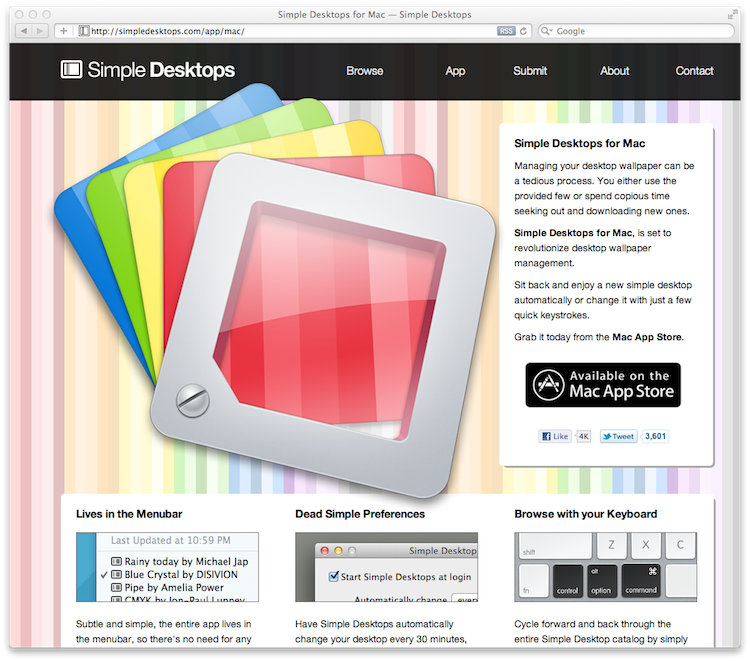
   <content type="html">&lt;p&gt;I&amp;rsquo;m pumped to finally share what I&amp;rsquo;ve been working on for the Mac: &lt;a href=&quot;http://bit.ly/simple-desktops-app&quot;&gt;Simple Desktops&lt;/a&gt;.&lt;/p&gt;

&lt;p&gt;This handy little app can change your desktop background automatically or on-demand, and it pulls
all of it&amp;rsquo;s content from &lt;a href=&quot;http://simpledesktops.com/&quot;&gt;SimpleDesktops.com&lt;/a&gt;, impeccably curated by Tom Watson.&lt;/p&gt;

&lt;p&gt;Big props go out to &lt;a href=&quot;http://gregaker.net/&quot;&gt;Greg Aker&lt;/a&gt; for server monkeying and &lt;a href=&quot;http://graphicpeel.com/&quot;&gt;Louis Harboe&lt;/a&gt; for the smashing icon.&lt;/p&gt;

&lt;p&gt;Buy it, rate it, tell your friends, &lt;a href=&quot;&amp;#109;&amp;#097;&amp;#105;&amp;#108;&amp;#116;&amp;#111;:&amp;#106;&amp;#117;&amp;#115;&amp;#116;&amp;#105;&amp;#110;&amp;#064;&amp;#098;&amp;#108;&amp;#101;&amp;#101;&amp;#100;&amp;#105;&amp;#110;&amp;#103;&amp;#119;&amp;#111;&amp;#108;&amp;#102;&amp;#046;&amp;#099;&amp;#111;&amp;#109;&quot;&gt;&amp;#101;&amp;#109;&amp;#097;&amp;#105;&amp;#108;&amp;#032;&amp;#109;&amp;#101;&lt;/a&gt; with any feedback.&lt;/p&gt;

&lt;p&gt;&lt;a href=&quot;http://bit.ly/simple-desktops-app&quot;&gt;&lt;img width=&quot;750&quot; height=&quot;661&quot; src=&quot;/static/post_assets/2011-09-06-simpledesktops.png&quot; alt=&quot;&quot; /&gt;&lt;/a&gt;&lt;/p&gt;
</content>
 </entry>
 
 <entry>
   <title>Creating and Consuming Data Sources in UIKit</title>
   <link href="http://justinvoss.com/2011/09/02/cocoa-data-sources/"/>
   <updated>2011-09-02T00:00:00-05:00</updated>
   <id>http://justinvoss.com/2011/09/02/cocoa-data-sources</id>
   <content type="html">&lt;p&gt;By popular demand in the comments from &lt;a href=&quot;http://justinvoss.com/2011/08/26/intro-to-delegation/&quot;&gt;last week&amp;rsquo;s article on delegates&lt;/a&gt;,
this week&amp;rsquo;s article is about data sources.
I&amp;rsquo;ll talk about what a data source is, why UIKit uses them, and how you can write
your own views that consume data sources.&lt;/p&gt;

&lt;h2 id=&quot;what-is-a-data-source&quot;&gt;What is A Data Source?&lt;/h2&gt;

&lt;p&gt;A data source is a species of delegate. It&amp;rsquo;s a separate object that provides data to
another according to a defined standard. That standard can be formal, like an Objective-C
protocol, but doesn&amp;rsquo;t need to be.&lt;/p&gt;

&lt;p&gt;The most common UIKit class that consumes data sources is &lt;a href=&quot;http://developer.apple.com/library/ios/documentation/UIKit/Reference/UITableView_Class/Reference/Reference.html&quot;&gt;UITableView&lt;/a&gt;. Typically, the view
controller of a particular screen will be both the delegate and the data source for a 
UITableView that takes up most or all of screen. This pattern is so common, in fact, that
Apple includes a view controller class called &lt;a href=&quot;http://developer.apple.com/library/ios/documentation/UIKit/Reference/UITableViewController_Class/Reference/Reference.html&quot;&gt;UITableViewController&lt;/a&gt; that does all this
wiring for you!&lt;/p&gt;

&lt;p&gt;To provide data to the table view, the data source implements at least these methods:&lt;/p&gt;

&lt;div class=&quot;highlight&quot;&gt;&lt;pre&gt;&lt;code class=&quot;objectivec&quot;&gt;&lt;span class=&quot;o&quot;&gt;-&lt;/span&gt; &lt;span class=&quot;p&quot;&gt;(&lt;/span&gt;&lt;span class=&quot;n&quot;&gt;NSInteger&lt;/span&gt;&lt;span class=&quot;p&quot;&gt;)&lt;/span&gt;&lt;span class=&quot;nl&quot;&gt;tableView:&lt;/span&gt;&lt;span class=&quot;p&quot;&gt;(&lt;/span&gt;&lt;span class=&quot;n&quot;&gt;UITableView&lt;/span&gt; &lt;span class=&quot;o&quot;&gt;*&lt;/span&gt;&lt;span class=&quot;p&quot;&gt;)&lt;/span&gt;&lt;span class=&quot;n&quot;&gt;tableView&lt;/span&gt; &lt;span class=&quot;nl&quot;&gt;numberOfRowsInSection:&lt;/span&gt;&lt;span class=&quot;p&quot;&gt;(&lt;/span&gt;&lt;span class=&quot;n&quot;&gt;NSInteger&lt;/span&gt;&lt;span class=&quot;p&quot;&gt;)&lt;/span&gt;&lt;span class=&quot;n&quot;&gt;section&lt;/span&gt;&lt;span class=&quot;p&quot;&gt;;&lt;/span&gt;
&lt;span class=&quot;o&quot;&gt;-&lt;/span&gt; &lt;span class=&quot;p&quot;&gt;(&lt;/span&gt;&lt;span class=&quot;n&quot;&gt;UITableViewCell&lt;/span&gt; &lt;span class=&quot;o&quot;&gt;*&lt;/span&gt;&lt;span class=&quot;p&quot;&gt;)&lt;/span&gt;&lt;span class=&quot;nl&quot;&gt;tableView:&lt;/span&gt;&lt;span class=&quot;p&quot;&gt;(&lt;/span&gt;&lt;span class=&quot;n&quot;&gt;UITableView&lt;/span&gt; &lt;span class=&quot;o&quot;&gt;*&lt;/span&gt;&lt;span class=&quot;p&quot;&gt;)&lt;/span&gt;&lt;span class=&quot;n&quot;&gt;tableView&lt;/span&gt; &lt;span class=&quot;nl&quot;&gt;cellForRowAtIndexPath:&lt;/span&gt;&lt;span class=&quot;p&quot;&gt;(&lt;/span&gt;&lt;span class=&quot;n&quot;&gt;NSIndexPath&lt;/span&gt; &lt;span class=&quot;o&quot;&gt;*&lt;/span&gt;&lt;span class=&quot;p&quot;&gt;)&lt;/span&gt;&lt;span class=&quot;n&quot;&gt;indexPath&lt;/span&gt;&lt;span class=&quot;p&quot;&gt;;&lt;/span&gt;
&lt;/code&gt;&lt;/pre&gt;
&lt;/div&gt;

&lt;p&gt;The first method, &lt;code&gt;tableView:numberOfRowsInSection:&lt;/code&gt;, is called by the table view to
determine how many rows are in the section with the given index. By default, a table view
has only one section, so in the simplest case the &lt;code&gt;section&lt;/code&gt; argument will always be zero.&lt;sup id=&quot;fnref:sections&quot;&gt;&lt;a href=&quot;#fn:sections&quot; rel=&quot;footnote&quot;&gt;1&lt;/a&gt;&lt;/sup&gt;
The data source should consult whatever data it has and return the number of rows the
table view should display.&lt;/p&gt;

&lt;p&gt;The second method, &lt;code&gt;tableView:cellForRowAtIndexPath:&lt;/code&gt;, is how the table view will determine
what content to display for a particular row in the table. The object returned here is an
instance of &lt;code&gt;UITableViewCell&lt;/code&gt;, which is a fully-fledged &lt;code&gt;UIView&lt;/code&gt; subclass.
The &lt;code&gt;indexPath&lt;/code&gt; argument is essentially a list of integers that describes the section and
row that the table view needs a cell for. To get the individual values, call the &lt;code&gt;section&lt;/code&gt;
and &lt;code&gt;row&lt;/code&gt; methods:&lt;sup id=&quot;fnref:indexpath&quot;&gt;&lt;a href=&quot;#fn:indexpath&quot; rel=&quot;footnote&quot;&gt;2&lt;/a&gt;&lt;/sup&gt;&lt;/p&gt;

&lt;div class=&quot;highlight&quot;&gt;&lt;pre&gt;&lt;code class=&quot;objectivec&quot;&gt;&lt;span class=&quot;n&quot;&gt;NSUInteger&lt;/span&gt; &lt;span class=&quot;n&quot;&gt;section&lt;/span&gt; &lt;span class=&quot;o&quot;&gt;=&lt;/span&gt; &lt;span class=&quot;p&quot;&gt;[&lt;/span&gt;&lt;span class=&quot;n&quot;&gt;indexPath&lt;/span&gt; &lt;span class=&quot;n&quot;&gt;section&lt;/span&gt;&lt;span class=&quot;p&quot;&gt;];&lt;/span&gt;
&lt;span class=&quot;n&quot;&gt;NSUInteger&lt;/span&gt; &lt;span class=&quot;n&quot;&gt;row&lt;/span&gt; &lt;span class=&quot;o&quot;&gt;=&lt;/span&gt; &lt;span class=&quot;p&quot;&gt;[&lt;/span&gt;&lt;span class=&quot;n&quot;&gt;indexPath&lt;/span&gt; &lt;span class=&quot;n&quot;&gt;row&lt;/span&gt;&lt;span class=&quot;p&quot;&gt;];&lt;/span&gt;
&lt;/code&gt;&lt;/pre&gt;
&lt;/div&gt;

&lt;p&gt;The actual implementation of &lt;code&gt;tableView:cellForRowAtIndexPath:&lt;/code&gt; is specific to the data you
want to display. As an extremely simple example, here&amp;rsquo;s what it might look like if you wanted
a plain table view and your data is simply an array of strings, in the &lt;code&gt;names&lt;/code&gt; attribute.&lt;/p&gt;

&lt;div class=&quot;highlight&quot;&gt;&lt;pre&gt;&lt;code class=&quot;objectivec&quot;&gt;&lt;span class=&quot;o&quot;&gt;-&lt;/span&gt; &lt;span class=&quot;p&quot;&gt;(&lt;/span&gt;&lt;span class=&quot;n&quot;&gt;UITableViewCell&lt;/span&gt; &lt;span class=&quot;o&quot;&gt;*&lt;/span&gt;&lt;span class=&quot;p&quot;&gt;)&lt;/span&gt;&lt;span class=&quot;nl&quot;&gt;tableView:&lt;/span&gt;&lt;span class=&quot;p&quot;&gt;(&lt;/span&gt;&lt;span class=&quot;n&quot;&gt;UITableView&lt;/span&gt; &lt;span class=&quot;o&quot;&gt;*&lt;/span&gt;&lt;span class=&quot;p&quot;&gt;)&lt;/span&gt;&lt;span class=&quot;n&quot;&gt;tableView&lt;/span&gt; &lt;span class=&quot;nl&quot;&gt;cellForRowAtIndexPath:&lt;/span&gt;&lt;span class=&quot;p&quot;&gt;(&lt;/span&gt;&lt;span class=&quot;n&quot;&gt;NSIndexPath&lt;/span&gt; &lt;span class=&quot;o&quot;&gt;*&lt;/span&gt;&lt;span class=&quot;p&quot;&gt;)&lt;/span&gt;&lt;span class=&quot;n&quot;&gt;indexPath&lt;/span&gt;
&lt;span class=&quot;p&quot;&gt;{&lt;/span&gt;
    &lt;span class=&quot;k&quot;&gt;static&lt;/span&gt; &lt;span class=&quot;n&quot;&gt;NSString&lt;/span&gt; &lt;span class=&quot;o&quot;&gt;*&lt;/span&gt;&lt;span class=&quot;n&quot;&gt;CellIdentifier&lt;/span&gt; &lt;span class=&quot;o&quot;&gt;=&lt;/span&gt; &lt;span class=&quot;s&quot;&gt;@&amp;quot;Cell&amp;quot;&lt;/span&gt;&lt;span class=&quot;p&quot;&gt;;&lt;/span&gt;
    
    &lt;span class=&quot;n&quot;&gt;UITableViewCell&lt;/span&gt; &lt;span class=&quot;o&quot;&gt;*&lt;/span&gt;&lt;span class=&quot;n&quot;&gt;cell&lt;/span&gt; &lt;span class=&quot;o&quot;&gt;=&lt;/span&gt; &lt;span class=&quot;p&quot;&gt;[&lt;/span&gt;&lt;span class=&quot;n&quot;&gt;tableView&lt;/span&gt; &lt;span class=&quot;nl&quot;&gt;dequeueReusableCellWithIdentifier:&lt;/span&gt;&lt;span class=&quot;n&quot;&gt;CellIdentifier&lt;/span&gt;&lt;span class=&quot;p&quot;&gt;];&lt;/span&gt;
    &lt;span class=&quot;k&quot;&gt;if&lt;/span&gt; &lt;span class=&quot;p&quot;&gt;(&lt;/span&gt;&lt;span class=&quot;n&quot;&gt;cell&lt;/span&gt; &lt;span class=&quot;o&quot;&gt;==&lt;/span&gt; &lt;span class=&quot;nb&quot;&gt;nil&lt;/span&gt;&lt;span class=&quot;p&quot;&gt;)&lt;/span&gt; &lt;span class=&quot;p&quot;&gt;{&lt;/span&gt;
        &lt;span class=&quot;n&quot;&gt;cell&lt;/span&gt; &lt;span class=&quot;o&quot;&gt;=&lt;/span&gt; &lt;span class=&quot;p&quot;&gt;[[[&lt;/span&gt;&lt;span class=&quot;n&quot;&gt;UITableViewCell&lt;/span&gt; &lt;span class=&quot;n&quot;&gt;alloc&lt;/span&gt;&lt;span class=&quot;p&quot;&gt;]&lt;/span&gt; &lt;span class=&quot;nl&quot;&gt;initWithFrame:&lt;/span&gt;&lt;span class=&quot;n&quot;&gt;CGRectZero&lt;/span&gt; &lt;span class=&quot;nl&quot;&gt;reuseIdentifier:&lt;/span&gt;&lt;span class=&quot;n&quot;&gt;CellIdentifier&lt;/span&gt;&lt;span class=&quot;p&quot;&gt;]&lt;/span&gt; &lt;span class=&quot;n&quot;&gt;autorelease&lt;/span&gt;&lt;span class=&quot;p&quot;&gt;];&lt;/span&gt;
    &lt;span class=&quot;p&quot;&gt;}&lt;/span&gt;
    
    &lt;span class=&quot;n&quot;&gt;NSString&lt;/span&gt; &lt;span class=&quot;o&quot;&gt;*&lt;/span&gt;&lt;span class=&quot;n&quot;&gt;currentName&lt;/span&gt; &lt;span class=&quot;o&quot;&gt;=&lt;/span&gt; &lt;span class=&quot;p&quot;&gt;[&lt;/span&gt;&lt;span class=&quot;n&quot;&gt;self&lt;/span&gt;&lt;span class=&quot;p&quot;&gt;.&lt;/span&gt;&lt;span class=&quot;n&quot;&gt;names&lt;/span&gt; &lt;span class=&quot;nl&quot;&gt;objectAtIndex:&lt;/span&gt;&lt;span class=&quot;n&quot;&gt;indexPath&lt;/span&gt;&lt;span class=&quot;p&quot;&gt;.&lt;/span&gt;&lt;span class=&quot;n&quot;&gt;row&lt;/span&gt;&lt;span class=&quot;p&quot;&gt;]&lt;/span&gt;
    &lt;span class=&quot;n&quot;&gt;cell&lt;/span&gt;&lt;span class=&quot;p&quot;&gt;.&lt;/span&gt;&lt;span class=&quot;n&quot;&gt;textLabel&lt;/span&gt;&lt;span class=&quot;p&quot;&gt;.&lt;/span&gt;&lt;span class=&quot;n&quot;&gt;text&lt;/span&gt; &lt;span class=&quot;o&quot;&gt;=&lt;/span&gt; &lt;span class=&quot;n&quot;&gt;currentName&lt;/span&gt;&lt;span class=&quot;p&quot;&gt;;&lt;/span&gt;
    
    &lt;span class=&quot;k&quot;&gt;return&lt;/span&gt; &lt;span class=&quot;n&quot;&gt;cell&lt;/span&gt;&lt;span class=&quot;p&quot;&gt;;&lt;/span&gt;
&lt;span class=&quot;p&quot;&gt;}&lt;/span&gt;
&lt;/code&gt;&lt;/pre&gt;
&lt;/div&gt;

&lt;p&gt;The business with &lt;code&gt;dequeueReusableCellWithIdentifier:&lt;/code&gt; is a caching mechanism that &lt;code&gt;UITableView&lt;/code&gt;
uses to avoid creating more cells than is strictly necessary. Since only a handful of cells will
ever be on-screen at any given instant, there&amp;rsquo;s no reason to create any more than a handful of cell
objects. As soon as a cell moves off-screen, it becomes reusable as a cell that&amp;rsquo;s about to come on-screen.&lt;/p&gt;

&lt;h2 id=&quot;the-reason-for-data-sources&quot;&gt;The Reason for Data Sources&lt;/h2&gt;

&lt;p&gt;You might be thinking that this seems like overkill. Why create a separate object and two separate
methods for controlling some cells in a list?&lt;/p&gt;

&lt;p&gt;The biggest reason is performance. For a small amount of data, the benefits of using the data source pattern
won&amp;rsquo;t be clear. But look at how many songs are in your iTunes library on your iDevice (you can see the
total in Settings &amp;gt; General &amp;gt; About). Right now, I have 1,297 songs on my iPhone. When I tap on the Songs
tab in the iPod app, only about eight rows are on-screen at a time. If every song was loaded in-memory, 1,289
of them would be wasted space because the user can&amp;rsquo;t see them.&lt;/p&gt;

&lt;p&gt;Instead, the only pieces of information that need to be calculated are:&lt;/p&gt;

&lt;ul&gt;
  &lt;li&gt;How many total songs are there?&lt;/li&gt;
  &lt;li&gt;What are the first eight?&lt;/li&gt;
&lt;/ul&gt;

&lt;p&gt;The total is an easily-cached number, since the music library on iOS is relatively static, and the first few rows
are quick to look up in SQLite.&lt;sup id=&quot;fnref:sqlite&quot;&gt;&lt;a href=&quot;#fn:sqlite&quot; rel=&quot;footnote&quot;&gt;3&lt;/a&gt;&lt;/sup&gt;&lt;/p&gt;

&lt;p&gt;Besides the memory usage issues, it may be that not all of the data is known at the time that the table view needs to
be displayed. If each row has an image that needs to be downloaded from a web server, you obviously may not want to
fetch all the images up front: it would be wiser to wait until that particular row is on-screen before starting
the download.&lt;/p&gt;

&lt;p&gt;Obviously, not every view in UIKit uses data sources: simple views like &lt;code&gt;UIImageView&lt;/code&gt; just have a property that represents
the data they need to display. Even a view as complex as &lt;a href=&quot;#&quot;&gt;&lt;code&gt;MKMapView&lt;/code&gt;&lt;/a&gt; doesn&amp;rsquo;t use a data source: each pin on the map
is added manually with &lt;code&gt;addAnnotation:&lt;/code&gt; or in bulk by setting the &lt;code&gt;annotations&lt;/code&gt; property.&lt;sup id=&quot;fnref:mapview&quot;&gt;&lt;a href=&quot;#fn:mapview&quot; rel=&quot;footnote&quot;&gt;4&lt;/a&gt;&lt;/sup&gt;
The right time to reach for the data source pattern is when performance is an issue and the data lends itself well to
being loaded piece-by-piece.&lt;/p&gt;

&lt;p&gt;Besides performance, separating the presentation of the data from the mechanics of loading it is just good engineering.
The view only needs to know how to display the data. Where it comes from and how much of it is loaded is outside the 
scope of that the user interface needs to worry about.&lt;/p&gt;

&lt;h2 id=&quot;consuming-data-sources&quot;&gt;Consuming Data Sources&lt;/h2&gt;

&lt;p&gt;While writing your app, you may want to create a view that has the same constraints as a table view: it needs to 
potentially display a lot of data, but only a fraction of it will be needed at any given moment. Sounds like a job for
a data source!&lt;/p&gt;

&lt;p&gt;The first step is to back away from the code and head for the whiteboard. Figure out your strategy for how the view
will interact with the data source; this will be different for every situation. When Kyle and I wrote the grid view
in &lt;a href=&quot;http://bit.ly/kowabunga-app&quot;&gt;Kowabunga&lt;/a&gt;, called &lt;code&gt;LOGridView&lt;/code&gt;, we decided to use a data source because we knew that at some point we would want multiple pages of
icons. Our strategy was to create a simplified version of the &lt;code&gt;UITableView&lt;/code&gt; data source. The two methods are:&lt;/p&gt;

&lt;div class=&quot;highlight&quot;&gt;&lt;pre&gt;&lt;code class=&quot;objectivec&quot;&gt;&lt;span class=&quot;o&quot;&gt;-&lt;/span&gt; &lt;span class=&quot;p&quot;&gt;(&lt;/span&gt;&lt;span class=&quot;n&quot;&gt;NSUInteger&lt;/span&gt;&lt;span class=&quot;p&quot;&gt;)&lt;/span&gt;&lt;span class=&quot;nl&quot;&gt;numberOfCellsInGridView:&lt;/span&gt;&lt;span class=&quot;p&quot;&gt;(&lt;/span&gt;&lt;span class=&quot;n&quot;&gt;LOGridView&lt;/span&gt; &lt;span class=&quot;o&quot;&gt;*&lt;/span&gt;&lt;span class=&quot;p&quot;&gt;)&lt;/span&gt;&lt;span class=&quot;n&quot;&gt;gridView&lt;/span&gt;&lt;span class=&quot;p&quot;&gt;;&lt;/span&gt;
&lt;span class=&quot;o&quot;&gt;-&lt;/span&gt; &lt;span class=&quot;p&quot;&gt;(&lt;/span&gt;&lt;span class=&quot;n&quot;&gt;LOGridViewCell&lt;/span&gt; &lt;span class=&quot;o&quot;&gt;*&lt;/span&gt;&lt;span class=&quot;p&quot;&gt;)&lt;/span&gt;&lt;span class=&quot;nl&quot;&gt;gridView:&lt;/span&gt;&lt;span class=&quot;p&quot;&gt;(&lt;/span&gt;&lt;span class=&quot;n&quot;&gt;LOGridView&lt;/span&gt; &lt;span class=&quot;o&quot;&gt;*&lt;/span&gt;&lt;span class=&quot;p&quot;&gt;)&lt;/span&gt;&lt;span class=&quot;n&quot;&gt;gridView&lt;/span&gt; &lt;span class=&quot;nl&quot;&gt;cellForObjectAtIndex:&lt;/span&gt;&lt;span class=&quot;p&quot;&gt;(&lt;/span&gt;&lt;span class=&quot;n&quot;&gt;NSUInteger&lt;/span&gt;&lt;span class=&quot;p&quot;&gt;)&lt;/span&gt;&lt;span class=&quot;n&quot;&gt;index&lt;/span&gt;&lt;span class=&quot;p&quot;&gt;;&lt;/span&gt;
&lt;/code&gt;&lt;/pre&gt;
&lt;/div&gt;

&lt;p&gt;The similarity between this and a table view data source should be obvious. The first method alone is enough for
the grid view to calculate how many pages of icons will be needed: it just divides the total by twelve, rounded up.&lt;/p&gt;

&lt;p&gt;As each page of icons comes on-screen, the grid view asks the data source for more cells. The first page asks for
cells 0-11, the second pages asks for cells 12-23, etc.&lt;/p&gt;

&lt;p&gt;After the grid view has been put on-screen and the data source is wired up, we call &lt;code&gt;reloadData&lt;/code&gt; on the grid view
to start laying out the grid. Each page in the view is an instance of &lt;code&gt;LOGridViewPage&lt;/code&gt;, which is a private class
that &lt;code&gt;LOGridView&lt;/code&gt; uses to organize the cells. Each page has it&amp;rsquo;s own &lt;code&gt;reloadData&lt;/code&gt; method, which is called on
 each page as it&amp;rsquo;s displayed:&lt;/p&gt;

&lt;div class=&quot;highlight&quot;&gt;&lt;pre&gt;&lt;code class=&quot;objectivec&quot;&gt;&lt;span class=&quot;c1&quot;&gt;// LOGridViewPage.m&lt;/span&gt;

&lt;span class=&quot;o&quot;&gt;-&lt;/span&gt; &lt;span class=&quot;p&quot;&gt;(&lt;/span&gt;&lt;span class=&quot;kt&quot;&gt;void&lt;/span&gt;&lt;span class=&quot;p&quot;&gt;)&lt;/span&gt;&lt;span class=&quot;n&quot;&gt;reloadData&lt;/span&gt;
&lt;span class=&quot;p&quot;&gt;{&lt;/span&gt;
    &lt;span class=&quot;c1&quot;&gt;// remove all the pre-existing cells&lt;/span&gt;
    &lt;span class=&quot;p&quot;&gt;[&lt;/span&gt;&lt;span class=&quot;n&quot;&gt;__cells&lt;/span&gt; &lt;span class=&quot;nl&quot;&gt;makeObjectsPerformSelector:&lt;/span&gt;&lt;span class=&quot;k&quot;&gt;@selector&lt;/span&gt;&lt;span class=&quot;p&quot;&gt;(&lt;/span&gt;&lt;span class=&quot;n&quot;&gt;removeFromSuperview&lt;/span&gt;&lt;span class=&quot;p&quot;&gt;)];&lt;/span&gt;
    &lt;span class=&quot;p&quot;&gt;[&lt;/span&gt;&lt;span class=&quot;n&quot;&gt;__cells&lt;/span&gt; &lt;span class=&quot;n&quot;&gt;removeAllObjects&lt;/span&gt;&lt;span class=&quot;p&quot;&gt;];&lt;/span&gt;
    
    &lt;span class=&quot;k&quot;&gt;if&lt;/span&gt;&lt;span class=&quot;p&quot;&gt;(&lt;/span&gt;&lt;span class=&quot;n&quot;&gt;__cells&lt;/span&gt; &lt;span class=&quot;o&quot;&gt;==&lt;/span&gt; &lt;span class=&quot;nb&quot;&gt;nil&lt;/span&gt;&lt;span class=&quot;p&quot;&gt;)&lt;/span&gt; &lt;span class=&quot;p&quot;&gt;{&lt;/span&gt;
        &lt;span class=&quot;n&quot;&gt;__cells&lt;/span&gt; &lt;span class=&quot;o&quot;&gt;=&lt;/span&gt; &lt;span class=&quot;p&quot;&gt;[[&lt;/span&gt;&lt;span class=&quot;n&quot;&gt;NSMutableArray&lt;/span&gt; &lt;span class=&quot;n&quot;&gt;alloc&lt;/span&gt;&lt;span class=&quot;p&quot;&gt;]&lt;/span&gt; &lt;span class=&quot;nl&quot;&gt;initWithCapacity:&lt;/span&gt;&lt;span class=&quot;p&quot;&gt;(&lt;/span&gt;&lt;span class=&quot;n&quot;&gt;self&lt;/span&gt;&lt;span class=&quot;p&quot;&gt;.&lt;/span&gt;&lt;span class=&quot;n&quot;&gt;endIndex&lt;/span&gt; &lt;span class=&quot;o&quot;&gt;-&lt;/span&gt; &lt;span class=&quot;n&quot;&gt;self&lt;/span&gt;&lt;span class=&quot;p&quot;&gt;.&lt;/span&gt;&lt;span class=&quot;n&quot;&gt;startIndex&lt;/span&gt;&lt;span class=&quot;p&quot;&gt;)];&lt;/span&gt;
    &lt;span class=&quot;p&quot;&gt;}&lt;/span&gt;
    
    &lt;span class=&quot;k&quot;&gt;for&lt;/span&gt;&lt;span class=&quot;p&quot;&gt;(&lt;/span&gt;&lt;span class=&quot;n&quot;&gt;NSUInteger&lt;/span&gt; &lt;span class=&quot;n&quot;&gt;index&lt;/span&gt; &lt;span class=&quot;o&quot;&gt;=&lt;/span&gt; &lt;span class=&quot;n&quot;&gt;self&lt;/span&gt;&lt;span class=&quot;p&quot;&gt;.&lt;/span&gt;&lt;span class=&quot;n&quot;&gt;startIndex&lt;/span&gt;&lt;span class=&quot;p&quot;&gt;;&lt;/span&gt; &lt;span class=&quot;n&quot;&gt;index&lt;/span&gt; &lt;span class=&quot;o&quot;&gt;&amp;lt;&lt;/span&gt; &lt;span class=&quot;n&quot;&gt;self&lt;/span&gt;&lt;span class=&quot;p&quot;&gt;.&lt;/span&gt;&lt;span class=&quot;n&quot;&gt;endIndex&lt;/span&gt;&lt;span class=&quot;p&quot;&gt;;&lt;/span&gt; &lt;span class=&quot;n&quot;&gt;index&lt;/span&gt;&lt;span class=&quot;o&quot;&gt;++&lt;/span&gt;&lt;span class=&quot;p&quot;&gt;)&lt;/span&gt; &lt;span class=&quot;p&quot;&gt;{&lt;/span&gt;

        &lt;span class=&quot;n&quot;&gt;LOGridViewCell&lt;/span&gt; &lt;span class=&quot;o&quot;&gt;*&lt;/span&gt;&lt;span class=&quot;n&quot;&gt;cell&lt;/span&gt; &lt;span class=&quot;o&quot;&gt;=&lt;/span&gt; &lt;span class=&quot;p&quot;&gt;[&lt;/span&gt;&lt;span class=&quot;n&quot;&gt;self&lt;/span&gt;&lt;span class=&quot;p&quot;&gt;.&lt;/span&gt;&lt;span class=&quot;n&quot;&gt;dataSource&lt;/span&gt; &lt;span class=&quot;nl&quot;&gt;gridView:&lt;/span&gt;&lt;span class=&quot;n&quot;&gt;self&lt;/span&gt;&lt;span class=&quot;p&quot;&gt;.&lt;/span&gt;&lt;span class=&quot;n&quot;&gt;gridView&lt;/span&gt; &lt;span class=&quot;nl&quot;&gt;cellForObjectAtIndex:&lt;/span&gt;&lt;span class=&quot;n&quot;&gt;index&lt;/span&gt;&lt;span class=&quot;p&quot;&gt;];&lt;/span&gt;
        &lt;span class=&quot;n&quot;&gt;cell&lt;/span&gt;&lt;span class=&quot;p&quot;&gt;.&lt;/span&gt;&lt;span class=&quot;n&quot;&gt;frame&lt;/span&gt; &lt;span class=&quot;o&quot;&gt;=&lt;/span&gt; &lt;span class=&quot;p&quot;&gt;[&lt;/span&gt;&lt;span class=&quot;n&quot;&gt;self&lt;/span&gt; &lt;span class=&quot;nl&quot;&gt;frameForCellAtIndex:&lt;/span&gt;&lt;span class=&quot;n&quot;&gt;index&lt;/span&gt;&lt;span class=&quot;p&quot;&gt;];&lt;/span&gt;
  
        &lt;span class=&quot;n&quot;&gt;UITapGestureRecognizer&lt;/span&gt; &lt;span class=&quot;o&quot;&gt;*&lt;/span&gt;&lt;span class=&quot;n&quot;&gt;gesture&lt;/span&gt; &lt;span class=&quot;o&quot;&gt;=&lt;/span&gt; &lt;span class=&quot;p&quot;&gt;[[[&lt;/span&gt;&lt;span class=&quot;n&quot;&gt;UITapGestureRecognizer&lt;/span&gt; &lt;span class=&quot;n&quot;&gt;alloc&lt;/span&gt;&lt;span class=&quot;p&quot;&gt;]&lt;/span&gt; &lt;span class=&quot;nl&quot;&gt;initWithTarget:&lt;/span&gt;&lt;span class=&quot;n&quot;&gt;self&lt;/span&gt;
                                                                                   &lt;span class=&quot;nl&quot;&gt;action:&lt;/span&gt;&lt;span class=&quot;k&quot;&gt;@selector&lt;/span&gt;&lt;span class=&quot;p&quot;&gt;(&lt;/span&gt;&lt;span class=&quot;nl&quot;&gt;cellWasTapped:&lt;/span&gt;&lt;span class=&quot;p&quot;&gt;)]&lt;/span&gt; &lt;span class=&quot;n&quot;&gt;autorelease&lt;/span&gt;&lt;span class=&quot;p&quot;&gt;];&lt;/span&gt;
        &lt;span class=&quot;p&quot;&gt;[&lt;/span&gt;&lt;span class=&quot;n&quot;&gt;cell&lt;/span&gt; &lt;span class=&quot;nl&quot;&gt;addGestureRecognizer:&lt;/span&gt;&lt;span class=&quot;n&quot;&gt;gesture&lt;/span&gt;&lt;span class=&quot;p&quot;&gt;];&lt;/span&gt;
        
        &lt;span class=&quot;p&quot;&gt;[&lt;/span&gt;&lt;span class=&quot;n&quot;&gt;__cells&lt;/span&gt; &lt;span class=&quot;nl&quot;&gt;addObject:&lt;/span&gt;&lt;span class=&quot;n&quot;&gt;cell&lt;/span&gt;&lt;span class=&quot;p&quot;&gt;];&lt;/span&gt;
        
        &lt;span class=&quot;p&quot;&gt;[&lt;/span&gt;&lt;span class=&quot;n&quot;&gt;self&lt;/span&gt; &lt;span class=&quot;nl&quot;&gt;addSubview:&lt;/span&gt;&lt;span class=&quot;n&quot;&gt;cell&lt;/span&gt;&lt;span class=&quot;p&quot;&gt;];&lt;/span&gt;		
    &lt;span class=&quot;p&quot;&gt;}&lt;/span&gt;
&lt;span class=&quot;p&quot;&gt;}&lt;/span&gt;
&lt;/code&gt;&lt;/pre&gt;
&lt;/div&gt;

&lt;p&gt;The heart of the method is the loop, where we load only the cells we need for this particular page. Each page
has attributes for the grid view, the data source, and the start and end indices, so it has enough information
to build up its grid of icons.&lt;/p&gt;

&lt;p&gt;Your view will need a similar method, although the way you determine what to display and how you ask for it will
be different. Maybe instead of discrete pages, like Kowabunga, your app has a more fluid layout like &lt;code&gt;UITableView&lt;/code&gt;.
In that case, you may need to calculate the start and end indices based on what&amp;rsquo;s on-screen.&lt;/p&gt;

&lt;p&gt;In general, you&amp;rsquo;ll need to understand both how the data is retrieved and how it&amp;rsquo;s displayed before you can determine
the right way to coordinate the two.&lt;/p&gt;

&lt;h2 id=&quot;until-next-time&quot;&gt;Until Next Time&lt;/h2&gt;

&lt;p&gt;That&amp;rsquo;s it for this week. Leave a comment below if I glossed over any details or made any mistakes (as if that ever happens&amp;hellip;)&lt;/p&gt;

&lt;p&gt;Let me know what you want to read about next week! I might change gears and talk about a non-Cocoa topic, like Django
or Coffeescript. It&amp;rsquo;s up to you!&lt;/p&gt;
&lt;div class=&quot;footnotes&quot;&gt;
  &lt;ol&gt;
    &lt;li id=&quot;fn:sections&quot;&gt;
      &lt;p&gt;If you need to have more than one section, the &lt;code&gt;numberOfSectionsInTableView:&lt;/code&gt; will 
let you control how many are displayed. The &lt;code&gt;tableView:numberOfRowsInSection:&lt;/code&gt; will be called
once for each section.&lt;a href=&quot;#fnref:sections&quot; rev=&quot;footnote&quot;&gt;&amp;#8617;&lt;/a&gt;&lt;/p&gt;
    &lt;/li&gt;
    &lt;li id=&quot;fn:indexpath&quot;&gt;
      &lt;p&gt;The &lt;code&gt;section&lt;/code&gt; and &lt;code&gt;row&lt;/code&gt; methods actually aren&amp;rsquo;t in the default implementation of
&lt;code&gt;NSIndexPath&lt;/code&gt;: they&amp;rsquo;re added by a UIKit category. These two helper methods are just
wrappers around the &lt;code&gt;indexAtPosition:&lt;/code&gt; method.&lt;a href=&quot;#fnref:indexpath&quot; rev=&quot;footnote&quot;&gt;&amp;#8617;&lt;/a&gt;&lt;/p&gt;
    &lt;/li&gt;
    &lt;li id=&quot;fn:sqlite&quot;&gt;
      &lt;p&gt;That&amp;rsquo;s assuming, of course, that the library data is in a SQLite database. It very well may not be, I
don&amp;rsquo;t know. The data in your own apps probably will be, since that&amp;rsquo;s one of the storage backends Core Data uses.&lt;a href=&quot;#fnref:sqlite&quot; rev=&quot;footnote&quot;&gt;&amp;#8617;&lt;/a&gt;&lt;/p&gt;
    &lt;/li&gt;
    &lt;li id=&quot;fn:mapview&quot;&gt;
      &lt;p&gt;According to Apple&amp;rsquo;s documentation, you should add all the annotations at once, even if they&amp;rsquo;re not on-screen.
As the user moves the map around, the map view will notify the delegate and ask it to create the pin views as-needed.
So you could consider this a hybrid model of delegation and using a data source.&lt;a href=&quot;#fnref:mapview&quot; rev=&quot;footnote&quot;&gt;&amp;#8617;&lt;/a&gt;&lt;/p&gt;
    &lt;/li&gt;
  &lt;/ol&gt;
&lt;/div&gt;
</content>
 </entry>
 
 <entry>
   <title>Talking About Fabric at CoMoRichWeb</title>
   <link href="http://justinvoss.com/2011/09/01/fabric-comorichweb/"/>
   <updated>2011-09-01T00:00:00-05:00</updated>
   <id>http://justinvoss.com/2011/09/01/fabric-comorichweb</id>
   <content type="html">&lt;p&gt;Last week, &lt;a href=&quot;http://www.gregaker.net/&quot;&gt;Greg Aker&lt;/a&gt; and I gave a talk at &lt;a href=&quot;http://comorichweb.posterous.com/&quot;&gt;CoMoRichWeb&lt;/a&gt; about &lt;a href=&quot;http://fabfile.org/&quot;&gt;Fabric&lt;/a&gt;,
a Python tool for automating sysadmin tasks over SSH. This is the first time at Comorichweb 
that we had someone record video, (thank you &lt;a href=&quot;http://twitter.com/rboyd&quot;&gt;Robert Boyd&lt;/a&gt;) so enjoy the talk below.&lt;/p&gt;

&lt;iframe src=&quot;http://player.vimeo.com/video/28457665?title=0&amp;amp;byline=0&amp;amp;portrait=0&amp;amp;color=ff9933&quot; width=&quot;750&quot; height=&quot;422&quot; frameborder=&quot;0&quot;&gt;&lt;/iframe&gt;
&lt;p&gt;&lt;a href=&quot;http://vimeo.com/28457665&quot;&gt;Fabric - Justin Voss &amp;amp; Greg Aker&lt;/a&gt; from &lt;a href=&quot;http://vimeo.com/user1357354&quot;&gt;CoMoRichWeb&lt;/a&gt; on &lt;a href=&quot;http://vimeo.com&quot;&gt;Vimeo&lt;/a&gt;.&lt;/p&gt;

&lt;h2 id=&quot;notes&quot;&gt;Notes&lt;/h2&gt;

&lt;ul&gt;
  &lt;li&gt;The Gist I referred to is my &lt;a href=&quot;https://gist.github.com/1035890&quot;&gt;Example Fabric and Cuisine Scripts&lt;/a&gt;.&lt;/li&gt;
  &lt;li&gt;Get &lt;a href=&quot;https://github.com/sebastien/cuisine&quot;&gt;Cuisine&lt;/a&gt; on GitHub.&lt;/li&gt;
&lt;/ul&gt;

</content>
 </entry>
 
 <entry>
   <title>Intro to Delegation - Core Location and Address Book UI</title>
   <link href="http://justinvoss.com/2011/08/26/intro-to-delegation/"/>
   <updated>2011-08-26T00:00:00-05:00</updated>
   <id>http://justinvoss.com/2011/08/26/intro-to-delegation</id>
   <content type="html">&lt;p&gt;In &lt;a href=&quot;http://justinvoss.com/2011/08/19/cocoa-target-action/&quot;&gt;my article last week about target-action&lt;/a&gt;, I mentioned the delegate pattern as 
another common pattern in Cocoa. Apple&amp;rsquo;s libraries make heavy use of delegation so you can reuse 
their code without needing to subclass the provided classes.&lt;/p&gt;

&lt;p&gt;To illustrate how to implement delegates, I&amp;rsquo;ll talk briefly about both the Core Location and
Address Book frameworks that are included in the iOS SDK.&lt;/p&gt;

&lt;h2 id=&quot;what-is-a-delegate&quot;&gt;What is a Delegate?&lt;/h2&gt;

&lt;p&gt;A delegate is a helper object that can react to or control events happening in another object.
For example, a &lt;code&gt;UITableView&lt;/code&gt; object notifies it&amp;rsquo;s delegate whenever the user taps on a row in the table,
asks it&amp;rsquo;s delegate what height to use for each row, and informs the delegate when cells are edited.&lt;sup id=&quot;fnref:table&quot;&gt;&lt;a href=&quot;#fn:table&quot; rel=&quot;footnote&quot;&gt;1&lt;/a&gt;&lt;/sup&gt;&lt;/p&gt;

&lt;p&gt;Unlike the target-action pattern, the delegate doesn&amp;rsquo;t get to choose it&amp;rsquo;s own method names: they&amp;rsquo;re 
defined by the class that uses it. Often the delegate is expected to implement more than one method in
order to have the most control over the other object. A common pattern is to have one method for successful
completion of a task, and another method for failure.&lt;/p&gt;

&lt;p&gt;APIs that rely on hardware or the network often use delegation as way to provide asynchronous responses.
When using the &lt;a href=&quot;http://developer.apple.com/library/ios/documentation/CoreLocation/Reference/CoreLocation_Framework/_index.html&quot;&gt;Core Location&lt;/a&gt; framework, your code may start a request for GPS data, but the chip 
needs a while to warm up and connect to the satellites. Instead of blocking or polling the hardware,
your code provides delegate methods that will be notified when the location data is ready to be used.&lt;/p&gt;

&lt;div class=&quot;highlight&quot;&gt;&lt;pre&gt;&lt;code class=&quot;objectivec&quot;&gt;&lt;span class=&quot;o&quot;&gt;-&lt;/span&gt; &lt;span class=&quot;p&quot;&gt;(&lt;/span&gt;&lt;span class=&quot;kt&quot;&gt;void&lt;/span&gt;&lt;span class=&quot;p&quot;&gt;)&lt;/span&gt;&lt;span class=&quot;nl&quot;&gt;viewDidAppear:&lt;/span&gt;&lt;span class=&quot;p&quot;&gt;(&lt;/span&gt;&lt;span class=&quot;kt&quot;&gt;BOOL&lt;/span&gt;&lt;span class=&quot;p&quot;&gt;)&lt;/span&gt;&lt;span class=&quot;n&quot;&gt;animated&lt;/span&gt;
&lt;span class=&quot;p&quot;&gt;{&lt;/span&gt;
  &lt;span class=&quot;n&quot;&gt;CLLocationManager&lt;/span&gt; &lt;span class=&quot;o&quot;&gt;*&lt;/span&gt;&lt;span class=&quot;n&quot;&gt;locationManager&lt;/span&gt; &lt;span class=&quot;o&quot;&gt;=&lt;/span&gt; &lt;span class=&quot;p&quot;&gt;[[&lt;/span&gt;&lt;span class=&quot;n&quot;&gt;CLLocationManager&lt;/span&gt; &lt;span class=&quot;n&quot;&gt;alloc&lt;/span&gt;&lt;span class=&quot;p&quot;&gt;]&lt;/span&gt; &lt;span class=&quot;n&quot;&gt;init&lt;/span&gt;&lt;span class=&quot;p&quot;&gt;];&lt;/span&gt;
  &lt;span class=&quot;n&quot;&gt;locationManager&lt;/span&gt;&lt;span class=&quot;p&quot;&gt;.&lt;/span&gt;&lt;span class=&quot;n&quot;&gt;delegate&lt;/span&gt; &lt;span class=&quot;o&quot;&gt;=&lt;/span&gt; &lt;span class=&quot;n&quot;&gt;self&lt;/span&gt;&lt;span class=&quot;p&quot;&gt;;&lt;/span&gt;
  &lt;span class=&quot;p&quot;&gt;[&lt;/span&gt;&lt;span class=&quot;n&quot;&gt;locationManager&lt;/span&gt; &lt;span class=&quot;n&quot;&gt;startUpdatingLocation&lt;/span&gt;&lt;span class=&quot;p&quot;&gt;];&lt;/span&gt;
&lt;span class=&quot;p&quot;&gt;}&lt;/span&gt;

&lt;span class=&quot;o&quot;&gt;-&lt;/span&gt; &lt;span class=&quot;p&quot;&gt;(&lt;/span&gt;&lt;span class=&quot;kt&quot;&gt;void&lt;/span&gt;&lt;span class=&quot;p&quot;&gt;)&lt;/span&gt;&lt;span class=&quot;nl&quot;&gt;locationManager:&lt;/span&gt;&lt;span class=&quot;p&quot;&gt;(&lt;/span&gt;&lt;span class=&quot;n&quot;&gt;CLLocationManager&lt;/span&gt; &lt;span class=&quot;o&quot;&gt;*&lt;/span&gt;&lt;span class=&quot;p&quot;&gt;)&lt;/span&gt;&lt;span class=&quot;n&quot;&gt;manager&lt;/span&gt;
    &lt;span class=&quot;nl&quot;&gt;didUpdateToLocation:&lt;/span&gt;&lt;span class=&quot;p&quot;&gt;(&lt;/span&gt;&lt;span class=&quot;n&quot;&gt;CLLocation&lt;/span&gt; &lt;span class=&quot;o&quot;&gt;*&lt;/span&gt;&lt;span class=&quot;p&quot;&gt;)&lt;/span&gt;&lt;span class=&quot;n&quot;&gt;location&lt;/span&gt;
           &lt;span class=&quot;nl&quot;&gt;fromLocation:&lt;/span&gt;&lt;span class=&quot;p&quot;&gt;(&lt;/span&gt;&lt;span class=&quot;n&quot;&gt;CLLocation&lt;/span&gt; &lt;span class=&quot;o&quot;&gt;*&lt;/span&gt;&lt;span class=&quot;p&quot;&gt;)&lt;/span&gt;&lt;span class=&quot;n&quot;&gt;oldLocation&lt;/span&gt;
&lt;span class=&quot;p&quot;&gt;{&lt;/span&gt;
  &lt;span class=&quot;n&quot;&gt;NSLog&lt;/span&gt;&lt;span class=&quot;p&quot;&gt;(&lt;/span&gt;&lt;span class=&quot;s&quot;&gt;@&amp;quot;The device&amp;#39;s new location is: %@&amp;quot;&lt;/span&gt;&lt;span class=&quot;p&quot;&gt;,&lt;/span&gt; &lt;span class=&quot;n&quot;&gt;location&lt;/span&gt;&lt;span class=&quot;p&quot;&gt;);&lt;/span&gt;
&lt;span class=&quot;p&quot;&gt;}&lt;/span&gt;
&lt;/code&gt;&lt;/pre&gt;
&lt;/div&gt;

&lt;p&gt;The &lt;code&gt;viewDidAppear:&lt;/code&gt; method starts up the location framework, which abstracts away the details of the
GPS (or cell tower triangulation). The &lt;code&gt;startUpdatingLocation&lt;/code&gt; method returns immediately, so your
app&amp;rsquo;s main thread won&amp;rsquo;t be blocked.&lt;/p&gt;

&lt;p&gt;At some point in the future, after the framework has determined the user&amp;rsquo;s location, the
&lt;code&gt;locationManager:didUpdateToLocation:fromLocation:&lt;/code&gt; method will be called.&lt;sup id=&quot;fnref:denied&quot;&gt;&lt;a href=&quot;#fn:denied&quot; rel=&quot;footnote&quot;&gt;2&lt;/a&gt;&lt;/sup&gt; As the user moves around,
the location manager will continue to call this method on the delegate until you ask it to stop
updating the location.&lt;/p&gt;

&lt;h2 id=&quot;side-note-protocols&quot;&gt;Side Note: Protocols&lt;/h2&gt;

&lt;p&gt;When working with delegates, you&amp;rsquo;ll hear a lot about Objective-C protocols. In a nutshell, a protocol is
a lot like an interface in other object-oriented languages. Some methods may be required, others may
be marked as optional.&lt;/p&gt;

&lt;p&gt;To declare that your class conforms to a particular protocol, you put the name of the protocol in 
angle brackets after the superclass name.&lt;/p&gt;

&lt;div class=&quot;highlight&quot;&gt;&lt;pre&gt;&lt;code class=&quot;objectivec&quot;&gt;&lt;span class=&quot;k&quot;&gt;@interface&lt;/span&gt; &lt;span class=&quot;nc&quot;&gt;AddContactDelegate&lt;/span&gt; : &lt;span class=&quot;nc&quot;&gt;NSObject&lt;/span&gt; &lt;span class=&quot;o&quot;&gt;&amp;lt;&lt;/span&gt;&lt;span class=&quot;n&quot;&gt;ABPeoplePickerNavigationControllerDelegate&lt;/span&gt;&lt;span class=&quot;o&quot;&gt;&amp;gt;&lt;/span&gt; &lt;span class=&quot;p&quot;&gt;{&lt;/span&gt;
    &lt;span class=&quot;n&quot;&gt;NSMutableArray&lt;/span&gt; &lt;span class=&quot;o&quot;&gt;*&lt;/span&gt;&lt;span class=&quot;n&quot;&gt;contacts&lt;/span&gt;&lt;span class=&quot;p&quot;&gt;;&lt;/span&gt;
&lt;span class=&quot;p&quot;&gt;}&lt;/span&gt;

&lt;span class=&quot;k&quot;&gt;@end&lt;/span&gt;
&lt;/code&gt;&lt;/pre&gt;
&lt;/div&gt;

&lt;h2 id=&quot;the-address-book-ui&quot;&gt;The Address Book UI&lt;/h2&gt;

&lt;p&gt;If your app needs to interact with the user&amp;rsquo;s contact list, you can access the data programmatically using
the &lt;a href=&quot;http://developer.apple.com/library/ios/documentation/ContactData/Conceptual/AddressBookProgrammingGuideforiPhone/Introduction.html&quot;&gt;Address Book and Address Book UI frameworks&lt;/a&gt;. The first is designed to give your app access to the
underlying contact data. The second is a set of pre-built views and interface elements for displaying,
editing, and choosing contacts.&lt;/p&gt;

&lt;p&gt;When displaying the Address Book UI views, your code participates by setting itself as a delegate of the
Apple-provided views. As the user makes their selections, your delegate will be notified and have the
opportunity to affect the workflow.&lt;/p&gt;

&lt;p&gt;To prompt the user to choose a property (like phone number) for a contact, you have to create an &lt;code&gt;ABPeoplePickerNavigationController&lt;/code&gt;
and give it a delegate. In &lt;a href=&quot;http://bit.ly/photo-dialer-app&quot;&gt;Photo Dialer&lt;/a&gt;&amp;rsquo;s case, that delegate is a &lt;code&gt;AddContactDelegate&lt;/code&gt;.
Here&amp;rsquo;s the actual code that one of the view controllers uses to present the UI:&lt;/p&gt;

&lt;div class=&quot;highlight&quot;&gt;&lt;pre&gt;&lt;code class=&quot;objectivec&quot;&gt;&lt;span class=&quot;c1&quot;&gt;// a long time ago, in a view controller far, far away&lt;/span&gt;

&lt;span class=&quot;o&quot;&gt;-&lt;/span&gt; &lt;span class=&quot;p&quot;&gt;(&lt;/span&gt;&lt;span class=&quot;kt&quot;&gt;IBAction&lt;/span&gt;&lt;span class=&quot;p&quot;&gt;)&lt;/span&gt;&lt;span class=&quot;nl&quot;&gt;addContact:&lt;/span&gt;&lt;span class=&quot;p&quot;&gt;(&lt;/span&gt;&lt;span class=&quot;kt&quot;&gt;id&lt;/span&gt;&lt;span class=&quot;p&quot;&gt;)&lt;/span&gt;&lt;span class=&quot;n&quot;&gt;sender&lt;/span&gt;
&lt;span class=&quot;p&quot;&gt;{&lt;/span&gt;
    &lt;span class=&quot;n&quot;&gt;ABPeoplePickerNavigationController&lt;/span&gt; &lt;span class=&quot;o&quot;&gt;*&lt;/span&gt;&lt;span class=&quot;n&quot;&gt;picker&lt;/span&gt; &lt;span class=&quot;o&quot;&gt;=&lt;/span&gt; &lt;span class=&quot;p&quot;&gt;[[&lt;/span&gt;&lt;span class=&quot;n&quot;&gt;ABPeoplePickerNavigationController&lt;/span&gt; &lt;span class=&quot;n&quot;&gt;alloc&lt;/span&gt;&lt;span class=&quot;p&quot;&gt;]&lt;/span&gt; &lt;span class=&quot;n&quot;&gt;init&lt;/span&gt;&lt;span class=&quot;p&quot;&gt;];&lt;/span&gt;
    &lt;span class=&quot;p&quot;&gt;[&lt;/span&gt;&lt;span class=&quot;n&quot;&gt;picker&lt;/span&gt; &lt;span class=&quot;nl&quot;&gt;setDisplayedProperties:&lt;/span&gt;&lt;span class=&quot;p&quot;&gt;[&lt;/span&gt;&lt;span class=&quot;n&quot;&gt;NSArray&lt;/span&gt; &lt;span class=&quot;nl&quot;&gt;arrayWithObject:&lt;/span&gt;&lt;span class=&quot;p&quot;&gt;[&lt;/span&gt;&lt;span class=&quot;n&quot;&gt;NSNumber&lt;/span&gt; &lt;span class=&quot;nl&quot;&gt;numberWithInt:&lt;/span&gt;&lt;span class=&quot;n&quot;&gt;kABPersonPhoneProperty&lt;/span&gt;&lt;span class=&quot;p&quot;&gt;]]];&lt;/span&gt;
    &lt;span class=&quot;n&quot;&gt;picker&lt;/span&gt;&lt;span class=&quot;p&quot;&gt;.&lt;/span&gt;&lt;span class=&quot;n&quot;&gt;peoplePickerDelegate&lt;/span&gt; &lt;span class=&quot;o&quot;&gt;=&lt;/span&gt; &lt;span class=&quot;p&quot;&gt;[[&lt;/span&gt;&lt;span class=&quot;n&quot;&gt;AddContactDelegate&lt;/span&gt; &lt;span class=&quot;n&quot;&gt;alloc&lt;/span&gt;&lt;span class=&quot;p&quot;&gt;]&lt;/span&gt; &lt;span class=&quot;n&quot;&gt;init&lt;/span&gt;&lt;span class=&quot;p&quot;&gt;];&lt;/span&gt;
    &lt;span class=&quot;p&quot;&gt;[&lt;/span&gt;&lt;span class=&quot;n&quot;&gt;self&lt;/span&gt; &lt;span class=&quot;nl&quot;&gt;presentModalViewController:&lt;/span&gt;&lt;span class=&quot;n&quot;&gt;picker&lt;/span&gt; &lt;span class=&quot;nl&quot;&gt;animated:&lt;/span&gt;&lt;span class=&quot;n&quot;&gt;YES&lt;/span&gt;&lt;span class=&quot;p&quot;&gt;];&lt;/span&gt;
&lt;span class=&quot;p&quot;&gt;}&lt;/span&gt;
&lt;/code&gt;&lt;/pre&gt;
&lt;/div&gt;

&lt;p&gt;The actual display of the user&amp;rsquo;s contacts, and managing the stack of views involved, is handled entirely
by Apple&amp;rsquo;s code. The only time Photo Dialer has to worry about it is in the delegate methods. As the user
selects a contact, selects a phone number, or presses &amp;ldquo;cancel&amp;rdquo;, the delegate is notified.&lt;/p&gt;

&lt;p&gt;After some of the methods, the delegate can tell the UI to stop allowing the user to drill down. This
doesn&amp;rsquo;t dismiss the view, however: you still have to manually remove it from the screen.&lt;/p&gt;

&lt;div class=&quot;highlight&quot;&gt;&lt;pre&gt;&lt;code class=&quot;objectivec&quot;&gt;&lt;span class=&quot;cp&quot;&gt;#import &amp;lt;AddressBook/AddressBook.h&amp;gt;&lt;/span&gt;
&lt;span class=&quot;cp&quot;&gt;#import &amp;lt;AddressBookUI/AddressBookUI.h&amp;gt;&lt;/span&gt;


&lt;span class=&quot;k&quot;&gt;@implementation&lt;/span&gt; &lt;span class=&quot;nc&quot;&gt;AddContactDelegate&lt;/span&gt;

&lt;span class=&quot;o&quot;&gt;-&lt;/span&gt; &lt;span class=&quot;p&quot;&gt;(&lt;/span&gt;&lt;span class=&quot;kt&quot;&gt;id&lt;/span&gt;&lt;span class=&quot;p&quot;&gt;)&lt;/span&gt;&lt;span class=&quot;n&quot;&gt;init&lt;/span&gt;
&lt;span class=&quot;p&quot;&gt;{&lt;/span&gt;
    &lt;span class=&quot;k&quot;&gt;if&lt;/span&gt;&lt;span class=&quot;p&quot;&gt;(&lt;/span&gt;&lt;span class=&quot;n&quot;&gt;self&lt;/span&gt; &lt;span class=&quot;o&quot;&gt;=&lt;/span&gt; &lt;span class=&quot;p&quot;&gt;[&lt;/span&gt;&lt;span class=&quot;n&quot;&gt;super&lt;/span&gt; &lt;span class=&quot;n&quot;&gt;init&lt;/span&gt;&lt;span class=&quot;p&quot;&gt;])&lt;/span&gt; &lt;span class=&quot;p&quot;&gt;{&lt;/span&gt;
        &lt;span class=&quot;n&quot;&gt;contacts&lt;/span&gt; &lt;span class=&quot;o&quot;&gt;=&lt;/span&gt; &lt;span class=&quot;p&quot;&gt;[[[&lt;/span&gt;&lt;span class=&quot;n&quot;&gt;ContactDataLoader&lt;/span&gt; &lt;span class=&quot;n&quot;&gt;sharedLoader&lt;/span&gt;&lt;span class=&quot;p&quot;&gt;]&lt;/span&gt; &lt;span class=&quot;n&quot;&gt;loadContactData&lt;/span&gt;&lt;span class=&quot;p&quot;&gt;]&lt;/span&gt; &lt;span class=&quot;n&quot;&gt;retain&lt;/span&gt;&lt;span class=&quot;p&quot;&gt;];&lt;/span&gt;
    &lt;span class=&quot;p&quot;&gt;}&lt;/span&gt;
    &lt;span class=&quot;k&quot;&gt;return&lt;/span&gt; &lt;span class=&quot;n&quot;&gt;self&lt;/span&gt;&lt;span class=&quot;p&quot;&gt;;&lt;/span&gt;
&lt;span class=&quot;p&quot;&gt;}&lt;/span&gt;

&lt;span class=&quot;o&quot;&gt;-&lt;/span&gt; &lt;span class=&quot;p&quot;&gt;(&lt;/span&gt;&lt;span class=&quot;kt&quot;&gt;void&lt;/span&gt;&lt;span class=&quot;p&quot;&gt;)&lt;/span&gt;&lt;span class=&quot;n&quot;&gt;dealloc&lt;/span&gt;
&lt;span class=&quot;p&quot;&gt;{&lt;/span&gt;
    &lt;span class=&quot;p&quot;&gt;[&lt;/span&gt;&lt;span class=&quot;n&quot;&gt;contacts&lt;/span&gt; &lt;span class=&quot;n&quot;&gt;release&lt;/span&gt;&lt;span class=&quot;p&quot;&gt;];&lt;/span&gt;
    &lt;span class=&quot;p&quot;&gt;[&lt;/span&gt;&lt;span class=&quot;n&quot;&gt;super&lt;/span&gt; &lt;span class=&quot;n&quot;&gt;dealloc&lt;/span&gt;&lt;span class=&quot;p&quot;&gt;];&lt;/span&gt;
&lt;span class=&quot;p&quot;&gt;}&lt;/span&gt;

&lt;span class=&quot;cp&quot;&gt;#pragma mark - People Picker&lt;/span&gt;

&lt;span class=&quot;o&quot;&gt;-&lt;/span&gt; &lt;span class=&quot;p&quot;&gt;(&lt;/span&gt;&lt;span class=&quot;kt&quot;&gt;void&lt;/span&gt;&lt;span class=&quot;p&quot;&gt;)&lt;/span&gt;&lt;span class=&quot;nl&quot;&gt;peoplePickerNavigationControllerDidCancel:&lt;/span&gt;&lt;span class=&quot;p&quot;&gt;(&lt;/span&gt;&lt;span class=&quot;n&quot;&gt;ABPeoplePickerNavigationController&lt;/span&gt; &lt;span class=&quot;o&quot;&gt;*&lt;/span&gt;&lt;span class=&quot;p&quot;&gt;)&lt;/span&gt;&lt;span class=&quot;n&quot;&gt;peoplePicker&lt;/span&gt;
&lt;span class=&quot;p&quot;&gt;{&lt;/span&gt;
    &lt;span class=&quot;p&quot;&gt;[&lt;/span&gt;&lt;span class=&quot;n&quot;&gt;peoplePicker&lt;/span&gt; &lt;span class=&quot;nl&quot;&gt;dismissModalViewControllerAnimated:&lt;/span&gt;&lt;span class=&quot;n&quot;&gt;YES&lt;/span&gt;&lt;span class=&quot;p&quot;&gt;];&lt;/span&gt;
&lt;span class=&quot;p&quot;&gt;}&lt;/span&gt;

&lt;span class=&quot;o&quot;&gt;-&lt;/span&gt; &lt;span class=&quot;p&quot;&gt;(&lt;/span&gt;&lt;span class=&quot;kt&quot;&gt;BOOL&lt;/span&gt;&lt;span class=&quot;p&quot;&gt;)&lt;/span&gt;&lt;span class=&quot;nl&quot;&gt;peoplePickerNavigationController:&lt;/span&gt;&lt;span class=&quot;p&quot;&gt;(&lt;/span&gt;&lt;span class=&quot;n&quot;&gt;ABPeoplePickerNavigationController&lt;/span&gt; &lt;span class=&quot;o&quot;&gt;*&lt;/span&gt;&lt;span class=&quot;p&quot;&gt;)&lt;/span&gt;&lt;span class=&quot;n&quot;&gt;peoplePicker&lt;/span&gt;
      &lt;span class=&quot;nl&quot;&gt;shouldContinueAfterSelectingPerson:&lt;/span&gt;&lt;span class=&quot;p&quot;&gt;(&lt;/span&gt;&lt;span class=&quot;n&quot;&gt;ABRecordRef&lt;/span&gt;&lt;span class=&quot;p&quot;&gt;)&lt;/span&gt;&lt;span class=&quot;n&quot;&gt;person&lt;/span&gt;
&lt;span class=&quot;p&quot;&gt;{&lt;/span&gt;
    &lt;span class=&quot;k&quot;&gt;return&lt;/span&gt; &lt;span class=&quot;n&quot;&gt;YES&lt;/span&gt;&lt;span class=&quot;p&quot;&gt;;&lt;/span&gt;
&lt;span class=&quot;p&quot;&gt;}&lt;/span&gt;

&lt;span class=&quot;o&quot;&gt;-&lt;/span&gt; &lt;span class=&quot;p&quot;&gt;(&lt;/span&gt;&lt;span class=&quot;kt&quot;&gt;BOOL&lt;/span&gt;&lt;span class=&quot;p&quot;&gt;)&lt;/span&gt;&lt;span class=&quot;nl&quot;&gt;peoplePickerNavigationController:&lt;/span&gt;&lt;span class=&quot;p&quot;&gt;(&lt;/span&gt;&lt;span class=&quot;n&quot;&gt;ABPeoplePickerNavigationController&lt;/span&gt; &lt;span class=&quot;o&quot;&gt;*&lt;/span&gt;&lt;span class=&quot;p&quot;&gt;)&lt;/span&gt;&lt;span class=&quot;n&quot;&gt;peoplePicker&lt;/span&gt; 
      &lt;span class=&quot;nl&quot;&gt;shouldContinueAfterSelectingPerson:&lt;/span&gt;&lt;span class=&quot;p&quot;&gt;(&lt;/span&gt;&lt;span class=&quot;n&quot;&gt;ABRecordRef&lt;/span&gt;&lt;span class=&quot;p&quot;&gt;)&lt;/span&gt;&lt;span class=&quot;n&quot;&gt;person&lt;/span&gt;
                                &lt;span class=&quot;nl&quot;&gt;property:&lt;/span&gt;&lt;span class=&quot;p&quot;&gt;(&lt;/span&gt;&lt;span class=&quot;n&quot;&gt;ABPropertyID&lt;/span&gt;&lt;span class=&quot;p&quot;&gt;)&lt;/span&gt;&lt;span class=&quot;n&quot;&gt;property&lt;/span&gt; 
                              &lt;span class=&quot;nl&quot;&gt;identifier:&lt;/span&gt;&lt;span class=&quot;p&quot;&gt;(&lt;/span&gt;&lt;span class=&quot;n&quot;&gt;ABMultiValueIdentifier&lt;/span&gt;&lt;span class=&quot;p&quot;&gt;)&lt;/span&gt;&lt;span class=&quot;n&quot;&gt;identifier&lt;/span&gt;
&lt;span class=&quot;p&quot;&gt;{&lt;/span&gt;
    
    &lt;span class=&quot;n&quot;&gt;PDContact&lt;/span&gt; &lt;span class=&quot;o&quot;&gt;*&lt;/span&gt;&lt;span class=&quot;n&quot;&gt;newContact&lt;/span&gt; &lt;span class=&quot;o&quot;&gt;=&lt;/span&gt; &lt;span class=&quot;p&quot;&gt;[&lt;/span&gt;&lt;span class=&quot;n&quot;&gt;PDContact&lt;/span&gt; &lt;span class=&quot;nl&quot;&gt;contactFromABRecord:&lt;/span&gt;&lt;span class=&quot;n&quot;&gt;person&lt;/span&gt; &lt;span class=&quot;nl&quot;&gt;identifier:&lt;/span&gt;&lt;span class=&quot;n&quot;&gt;identifier&lt;/span&gt;&lt;span class=&quot;p&quot;&gt;];&lt;/span&gt;
    &lt;span class=&quot;p&quot;&gt;[&lt;/span&gt;&lt;span class=&quot;n&quot;&gt;contacts&lt;/span&gt; &lt;span class=&quot;nl&quot;&gt;addObject:&lt;/span&gt;&lt;span class=&quot;n&quot;&gt;newContact&lt;/span&gt;&lt;span class=&quot;p&quot;&gt;];&lt;/span&gt;
    &lt;span class=&quot;p&quot;&gt;[[&lt;/span&gt;&lt;span class=&quot;n&quot;&gt;ContactDataLoader&lt;/span&gt; &lt;span class=&quot;n&quot;&gt;sharedLoader&lt;/span&gt;&lt;span class=&quot;p&quot;&gt;]&lt;/span&gt; &lt;span class=&quot;n&quot;&gt;saveContactData&lt;/span&gt;&lt;span class=&quot;p&quot;&gt;];&lt;/span&gt;
    &lt;span class=&quot;p&quot;&gt;[&lt;/span&gt;&lt;span class=&quot;n&quot;&gt;peoplePicker&lt;/span&gt; &lt;span class=&quot;nl&quot;&gt;dismissModalViewControllerAnimated:&lt;/span&gt;&lt;span class=&quot;n&quot;&gt;YES&lt;/span&gt;&lt;span class=&quot;p&quot;&gt;];&lt;/span&gt;
    
    &lt;span class=&quot;k&quot;&gt;return&lt;/span&gt; &lt;span class=&quot;n&quot;&gt;NO&lt;/span&gt;&lt;span class=&quot;p&quot;&gt;;&lt;/span&gt;
&lt;span class=&quot;p&quot;&gt;}&lt;/span&gt;

&lt;span class=&quot;k&quot;&gt;@end&lt;/span&gt;
&lt;/code&gt;&lt;/pre&gt;
&lt;/div&gt;

&lt;p&gt;The specifics of what all the Address Book objects represent isn&amp;rsquo;t important, except that an
&lt;code&gt;ABRecordRef&lt;/code&gt; represents a particular person, and the &lt;code&gt;ABMultiValueIdentifier&lt;/code&gt; specifies which
of potentially many phone numbers the user tapped on.&lt;/p&gt;

&lt;p&gt;By wrapping these views in a reusable class and providing a mechanism for a delegate to participate,
Apple has allowed us to remove a lot of code that we would normally have to write ourselves.&lt;/p&gt;

&lt;h2 id=&quot;delegating-in-your-code&quot;&gt;Delegating in Your Code&lt;/h2&gt;

&lt;p&gt;When designing your own objects, take a minute to consider if the app-specific features could be
implemented by a delegate, leaving reusable code in the original class. For example, if your app uses
WebSockets to connect to a live stream of data, split the WebSocket-specifics into a generic class that
delegates to an app-specific class. You might find that with just a few delegate methods, most of 
the code can be reused in another app without changes: just give it a different delegate.&lt;/p&gt;

&lt;p&gt;When using a delegate from your class, keep a few tips and tricks in mind:&lt;/p&gt;

&lt;ul&gt;
  &lt;li&gt;Don&amp;rsquo;t retain the delegate. Most of Apple&amp;rsquo;s classes don&amp;rsquo;t, so users of your code will be surprised
with an ugly memory leak if yours does.&lt;/li&gt;
  &lt;li&gt;The first argument to each delegate method should be the object that triggered the call. It seems
redundant now, but as soon as you need to handle two objects with the same delegate, you&amp;rsquo;ll be glad
you added it.&lt;/li&gt;
  &lt;li&gt;Consider defining the required methods in a protocol. It&amp;rsquo;s a bit more work up front, but then 
the compiler will be able to help you spot any omissions.&lt;/li&gt;
  &lt;li&gt;If you don&amp;rsquo;t use a protocol, or have optional methods in your protocol, make sure to use
&lt;code&gt;respondsToSelector:&lt;/code&gt; to make sure the delegate supports the method you&amp;rsquo;re about to call.&lt;/li&gt;
&lt;/ul&gt;

&lt;h2 id=&quot;next-week&quot;&gt;Next Week&lt;/h2&gt;

&lt;p&gt;What do you want to read for next Friday&amp;rsquo;s article? I&amp;rsquo;m thinking either data sources, or diving
into something more advanced, like working with REST APIs or Bonjour networking. Cast your vote
for next week&amp;rsquo;s topic in the comments!&lt;/p&gt;

&lt;div class=&quot;footnotes&quot;&gt;
  &lt;ol&gt;
    &lt;li id=&quot;fn:table&quot;&gt;
      &lt;p&gt;Table views in particular have two helper objects: the delegate and the datasource. The datasource is what
the table view uses to determine what information to display, while the delegate controls almost every
other aspect of the view.&lt;a href=&quot;#fnref:table&quot; rev=&quot;footnote&quot;&gt;&amp;#8617;&lt;/a&gt;&lt;/p&gt;
    &lt;/li&gt;
    &lt;li id=&quot;fn:denied&quot;&gt;
      &lt;p&gt;Not only could there be several seconds between the two method calls above, but iOS will 
ask the user for their permission before revealing their GPS location. If the user denies you, 
the second method may never be called at all!&lt;a href=&quot;#fnref:denied&quot; rev=&quot;footnote&quot;&gt;&amp;#8617;&lt;/a&gt;&lt;/p&gt;
    &lt;/li&gt;
  &lt;/ol&gt;
&lt;/div&gt;
</content>
 </entry>
 
 <entry>
   <title>Cocoa's Target-Action Pattern</title>
   <link href="http://justinvoss.com/2011/08/19/cocoa-target-action/"/>
   <updated>2011-08-19T00:00:00-05:00</updated>
   <id>http://justinvoss.com/2011/08/19/cocoa-target-action</id>
   <content type="html">&lt;p&gt;Despite being a thin wrapper on top of C, Objective-C has dynamic features that make it
feel more like a peer to Ruby than to C++. In this short article, I&amp;rsquo;ll introduce one of
those features and show you how to use it in your code to reduce coupling and increase reuse.&lt;/p&gt;

&lt;h2 id=&quot;selectors&quot;&gt;Selectors&lt;/h2&gt;

&lt;p&gt;A selector is essentially the name of an Objective-C method, realized as an object in code.
It has the type &lt;code&gt;SEL&lt;/code&gt;, which is a primitive (no memory management needed).
The actual contents of the selector are opaque, but you can get one from a method name with
the &lt;code&gt;@selector()&lt;/code&gt; syntax.&lt;/p&gt;

&lt;div class=&quot;highlight&quot;&gt;&lt;pre&gt;&lt;code class=&quot;objectivec&quot;&gt;&lt;span class=&quot;kt&quot;&gt;SEL&lt;/span&gt; &lt;span class=&quot;n&quot;&gt;setToolbar&lt;/span&gt; &lt;span class=&quot;o&quot;&gt;=&lt;/span&gt; &lt;span class=&quot;k&quot;&gt;@selector&lt;/span&gt;&lt;span class=&quot;p&quot;&gt;(&lt;/span&gt;&lt;span class=&quot;nl&quot;&gt;setToolbarItems:animated:&lt;/span&gt;&lt;span class=&quot;p&quot;&gt;);&lt;/span&gt;
&lt;/code&gt;&lt;/pre&gt;
&lt;/div&gt;

&lt;p&gt;You can also get a selector from an NSString. This is handy if you want to store the selector
in a config file.&lt;/p&gt;

&lt;div class=&quot;highlight&quot;&gt;&lt;pre&gt;&lt;code class=&quot;objectivec&quot;&gt;&lt;span class=&quot;kt&quot;&gt;SEL&lt;/span&gt; &lt;span class=&quot;n&quot;&gt;setToolbar&lt;/span&gt; &lt;span class=&quot;o&quot;&gt;=&lt;/span&gt; &lt;span class=&quot;n&quot;&gt;NSSelectorFromString&lt;/span&gt;&lt;span class=&quot;p&quot;&gt;(&lt;/span&gt;&lt;span class=&quot;s&quot;&gt;@&amp;quot;setToolbarItems:animated:&amp;quot;&lt;/span&gt;&lt;span class=&quot;p&quot;&gt;);&lt;/span&gt;
&lt;/code&gt;&lt;/pre&gt;
&lt;/div&gt;

&lt;h2 id=&quot;using-selectors&quot;&gt;Using Selectors&lt;/h2&gt;

&lt;p&gt;Once you have the selector, there&amp;rsquo;s a few things you can do with it.&lt;/p&gt;

&lt;p&gt;You can ask an object if it responds to that selector; this is like asking if the object
implements this method. If you&amp;rsquo;ve ever done reflection in Java, prepare for a breath of
fresh air!&lt;/p&gt;

&lt;div class=&quot;highlight&quot;&gt;&lt;pre&gt;&lt;code class=&quot;objectivec&quot;&gt;&lt;span class=&quot;k&quot;&gt;if&lt;/span&gt; &lt;span class=&quot;p&quot;&gt;([&lt;/span&gt;&lt;span class=&quot;n&quot;&gt;controller&lt;/span&gt; &lt;span class=&quot;nl&quot;&gt;respondsToSelector:&lt;/span&gt;&lt;span class=&quot;k&quot;&gt;@selector&lt;/span&gt;&lt;span class=&quot;p&quot;&gt;(&lt;/span&gt;&lt;span class=&quot;nl&quot;&gt;setToolbarItems:animated:&lt;/span&gt;&lt;span class=&quot;p&quot;&gt;)])&lt;/span&gt; &lt;span class=&quot;p&quot;&gt;{&lt;/span&gt;
  &lt;span class=&quot;cm&quot;&gt;/* it&amp;#39;s possible to set toolbar items on this controller */&lt;/span&gt;
&lt;span class=&quot;p&quot;&gt;}&lt;/span&gt;
&lt;/code&gt;&lt;/pre&gt;
&lt;/div&gt;

&lt;p&gt;You can ask an object to perform that selector:&lt;/p&gt;

&lt;div class=&quot;highlight&quot;&gt;&lt;pre&gt;&lt;code class=&quot;objectivec&quot;&gt;&lt;span class=&quot;c1&quot;&gt;// direct&lt;/span&gt;
&lt;span class=&quot;p&quot;&gt;[&lt;/span&gt;&lt;span class=&quot;n&quot;&gt;controller&lt;/span&gt; &lt;span class=&quot;n&quot;&gt;viewDidLoad&lt;/span&gt;&lt;span class=&quot;p&quot;&gt;];&lt;/span&gt;

&lt;span class=&quot;c1&quot;&gt;// indirect&lt;/span&gt;
&lt;span class=&quot;kt&quot;&gt;SEL&lt;/span&gt; &lt;span class=&quot;n&quot;&gt;action&lt;/span&gt; &lt;span class=&quot;o&quot;&gt;=&lt;/span&gt; &lt;span class=&quot;k&quot;&gt;@selector&lt;/span&gt;&lt;span class=&quot;p&quot;&gt;(&lt;/span&gt;&lt;span class=&quot;n&quot;&gt;viewDidLoad&lt;/span&gt;&lt;span class=&quot;p&quot;&gt;);&lt;/span&gt;
&lt;span class=&quot;p&quot;&gt;[&lt;/span&gt;&lt;span class=&quot;n&quot;&gt;controller&lt;/span&gt; &lt;span class=&quot;nl&quot;&gt;performSelector:&lt;/span&gt;&lt;span class=&quot;n&quot;&gt;action&lt;/span&gt;&lt;span class=&quot;p&quot;&gt;];&lt;/span&gt;
&lt;/code&gt;&lt;/pre&gt;
&lt;/div&gt;

&lt;p&gt;This is the same as calling the method directly, but because the selector could come from a
variable, it&amp;rsquo;s possible to change the method at runtime.&lt;/p&gt;

&lt;p&gt;For example, &lt;code&gt;UIBarButtonItem&lt;/code&gt; uses a target and action to call your code when the button is tapped.
You might have some code in your view controller like this:&lt;/p&gt;

&lt;div class=&quot;highlight&quot;&gt;&lt;pre&gt;&lt;code class=&quot;objectivec&quot;&gt;&lt;span class=&quot;o&quot;&gt;-&lt;/span&gt; &lt;span class=&quot;p&quot;&gt;(&lt;/span&gt;&lt;span class=&quot;kt&quot;&gt;void&lt;/span&gt;&lt;span class=&quot;p&quot;&gt;)&lt;/span&gt;&lt;span class=&quot;n&quot;&gt;viewDidLoad&lt;/span&gt;
&lt;span class=&quot;p&quot;&gt;{&lt;/span&gt;
  
  &lt;span class=&quot;n&quot;&gt;button&lt;/span&gt; &lt;span class=&quot;o&quot;&gt;=&lt;/span&gt; &lt;span class=&quot;p&quot;&gt;[[&lt;/span&gt;&lt;span class=&quot;n&quot;&gt;UIBarButtonItem&lt;/span&gt; &lt;span class=&quot;n&quot;&gt;alloc&lt;/span&gt;&lt;span class=&quot;p&quot;&gt;]&lt;/span&gt; &lt;span class=&quot;nl&quot;&gt;initWithTitle:&lt;/span&gt;&lt;span class=&quot;s&quot;&gt;@&amp;quot;Done&amp;quot;&lt;/span&gt;
                                            &lt;span class=&quot;nl&quot;&gt;style:&lt;/span&gt;&lt;span class=&quot;n&quot;&gt;UIBarButtonItemStyleBordered&lt;/span&gt;
                                           &lt;span class=&quot;nl&quot;&gt;target:&lt;/span&gt;&lt;span class=&quot;n&quot;&gt;self&lt;/span&gt;
                                           &lt;span class=&quot;nl&quot;&gt;action:&lt;/span&gt;&lt;span class=&quot;k&quot;&gt;@selector&lt;/span&gt;&lt;span class=&quot;p&quot;&gt;(&lt;/span&gt;&lt;span class=&quot;nl&quot;&gt;doneButtonHit:&lt;/span&gt;&lt;span class=&quot;p&quot;&gt;)];&lt;/span&gt;
  &lt;span class=&quot;c1&quot;&gt;// more code&lt;/span&gt;
&lt;span class=&quot;p&quot;&gt;}&lt;/span&gt;

&lt;span class=&quot;o&quot;&gt;-&lt;/span&gt; &lt;span class=&quot;p&quot;&gt;(&lt;/span&gt;&lt;span class=&quot;kt&quot;&gt;void&lt;/span&gt;&lt;span class=&quot;p&quot;&gt;)&lt;/span&gt;&lt;span class=&quot;nl&quot;&gt;doneButtonHit:&lt;/span&gt;&lt;span class=&quot;p&quot;&gt;(&lt;/span&gt;&lt;span class=&quot;kt&quot;&gt;id&lt;/span&gt;&lt;span class=&quot;p&quot;&gt;)&lt;/span&gt;&lt;span class=&quot;n&quot;&gt;sender&lt;/span&gt;
&lt;span class=&quot;p&quot;&gt;{&lt;/span&gt;
  &lt;span class=&quot;n&quot;&gt;NSLog&lt;/span&gt;&lt;span class=&quot;p&quot;&gt;(&lt;/span&gt;&lt;span class=&quot;s&quot;&gt;@&amp;quot;The done button was tapped!&amp;quot;&lt;/span&gt;&lt;span class=&quot;p&quot;&gt;);&lt;/span&gt;
&lt;span class=&quot;p&quot;&gt;}&lt;/span&gt;
&lt;/code&gt;&lt;/pre&gt;
&lt;/div&gt;

&lt;p&gt;When you run the app and tap on the button, you&amp;rsquo;ll see &amp;ldquo;The done button was tapped!&amp;rdquo; in the console.
It&amp;rsquo;s as if the button has a line of code like &lt;code&gt;[controller doneButtonHit:self]&lt;/code&gt;, but obviously it
doesn&amp;rsquo;t: the button is a generic object that you can use off-the-shelf. The secret sauce is &lt;code&gt;performSelector&lt;/code&gt;!&lt;/p&gt;

&lt;p&gt;This pattern, called &amp;ldquo;target-action&amp;rdquo;, is used throughout Cocoa, especially in user interface code.
It allows the UI widgets to stay generic, while making it easy to integrate your custom controller
without needing to subclass anything.&lt;/p&gt;

&lt;h2 id=&quot;implementing-target-action&quot;&gt;Implementing Target-Action&lt;/h2&gt;

&lt;p&gt;Let&amp;rsquo;s write a really simple object that implements the target-action pattern. We&amp;rsquo;ll call it a button,
but we&amp;rsquo;ll skip writing any view-related code. For simplicity, let&amp;rsquo;s assume that when the user taps
on the button, the button will receive the &lt;code&gt;tap&lt;/code&gt; message.&lt;/p&gt;

&lt;p&gt;Here&amp;rsquo;s our interface.&lt;/p&gt;

&lt;div class=&quot;highlight&quot;&gt;&lt;pre&gt;&lt;code class=&quot;objectivec&quot;&gt;&lt;span class=&quot;k&quot;&gt;@interface&lt;/span&gt; &lt;span class=&quot;nc&quot;&gt;JVButton&lt;/span&gt; : &lt;span class=&quot;nc&quot;&gt;NSObject&lt;/span&gt; &lt;span class=&quot;p&quot;&gt;{&lt;/span&gt;
  &lt;span class=&quot;kt&quot;&gt;id&lt;/span&gt; &lt;span class=&quot;n&quot;&gt;_target&lt;/span&gt;&lt;span class=&quot;p&quot;&gt;;&lt;/span&gt;
  &lt;span class=&quot;kt&quot;&gt;SEL&lt;/span&gt; &lt;span class=&quot;n&quot;&gt;_action&lt;/span&gt;&lt;span class=&quot;p&quot;&gt;;&lt;/span&gt;
&lt;span class=&quot;p&quot;&gt;}&lt;/span&gt;

&lt;span class=&quot;o&quot;&gt;-&lt;/span&gt; &lt;span class=&quot;p&quot;&gt;(&lt;/span&gt;&lt;span class=&quot;kt&quot;&gt;void&lt;/span&gt;&lt;span class=&quot;p&quot;&gt;)&lt;/span&gt;&lt;span class=&quot;nl&quot;&gt;initWithTarget:&lt;/span&gt;&lt;span class=&quot;p&quot;&gt;(&lt;/span&gt;&lt;span class=&quot;kt&quot;&gt;id&lt;/span&gt;&lt;span class=&quot;p&quot;&gt;)&lt;/span&gt;&lt;span class=&quot;n&quot;&gt;target&lt;/span&gt; &lt;span class=&quot;nl&quot;&gt;action:&lt;/span&gt;&lt;span class=&quot;p&quot;&gt;(&lt;/span&gt;&lt;span class=&quot;kt&quot;&gt;SEL&lt;/span&gt;&lt;span class=&quot;p&quot;&gt;)&lt;/span&gt;&lt;span class=&quot;n&quot;&gt;action&lt;/span&gt;&lt;span class=&quot;p&quot;&gt;;&lt;/span&gt;

&lt;span class=&quot;o&quot;&gt;-&lt;/span&gt; &lt;span class=&quot;p&quot;&gt;(&lt;/span&gt;&lt;span class=&quot;kt&quot;&gt;void&lt;/span&gt;&lt;span class=&quot;p&quot;&gt;)&lt;/span&gt;&lt;span class=&quot;n&quot;&gt;tap&lt;/span&gt;&lt;span class=&quot;p&quot;&gt;;&lt;/span&gt;

&lt;span class=&quot;k&quot;&gt;@end&lt;/span&gt;
&lt;/code&gt;&lt;/pre&gt;
&lt;/div&gt;

&lt;p&gt;And here&amp;rsquo;s the implementation.&lt;/p&gt;

&lt;div class=&quot;highlight&quot;&gt;&lt;pre&gt;&lt;code class=&quot;objectivec&quot;&gt;&lt;span class=&quot;k&quot;&gt;@implementation&lt;/span&gt; &lt;span class=&quot;nc&quot;&gt;JVButton&lt;/span&gt;

&lt;span class=&quot;o&quot;&gt;-&lt;/span&gt; &lt;span class=&quot;p&quot;&gt;(&lt;/span&gt;&lt;span class=&quot;kt&quot;&gt;void&lt;/span&gt;&lt;span class=&quot;p&quot;&gt;)&lt;/span&gt;&lt;span class=&quot;nl&quot;&gt;initWithTarget:&lt;/span&gt;&lt;span class=&quot;p&quot;&gt;(&lt;/span&gt;&lt;span class=&quot;kt&quot;&gt;id&lt;/span&gt;&lt;span class=&quot;p&quot;&gt;)&lt;/span&gt;&lt;span class=&quot;n&quot;&gt;target&lt;/span&gt; &lt;span class=&quot;nl&quot;&gt;action:&lt;/span&gt;&lt;span class=&quot;p&quot;&gt;(&lt;/span&gt;&lt;span class=&quot;kt&quot;&gt;SEL&lt;/span&gt;&lt;span class=&quot;p&quot;&gt;)&lt;/span&gt;&lt;span class=&quot;n&quot;&gt;action&lt;/span&gt;
&lt;span class=&quot;p&quot;&gt;{&lt;/span&gt;
  &lt;span class=&quot;n&quot;&gt;self&lt;/span&gt; &lt;span class=&quot;o&quot;&gt;=&lt;/span&gt; &lt;span class=&quot;p&quot;&gt;[&lt;/span&gt;&lt;span class=&quot;n&quot;&gt;super&lt;/span&gt; &lt;span class=&quot;n&quot;&gt;init&lt;/span&gt;&lt;span class=&quot;p&quot;&gt;];&lt;/span&gt;
  &lt;span class=&quot;k&quot;&gt;if&lt;/span&gt; &lt;span class=&quot;p&quot;&gt;(&lt;/span&gt;&lt;span class=&quot;n&quot;&gt;self&lt;/span&gt;&lt;span class=&quot;p&quot;&gt;)&lt;/span&gt; &lt;span class=&quot;p&quot;&gt;{&lt;/span&gt;
    &lt;span class=&quot;n&quot;&gt;_target&lt;/span&gt; &lt;span class=&quot;o&quot;&gt;=&lt;/span&gt; &lt;span class=&quot;n&quot;&gt;target&lt;/span&gt;&lt;span class=&quot;p&quot;&gt;;&lt;/span&gt;
    &lt;span class=&quot;n&quot;&gt;_action&lt;/span&gt; &lt;span class=&quot;o&quot;&gt;=&lt;/span&gt; &lt;span class=&quot;n&quot;&gt;action&lt;/span&gt;&lt;span class=&quot;p&quot;&gt;;&lt;/span&gt;
  &lt;span class=&quot;p&quot;&gt;}&lt;/span&gt;
  &lt;span class=&quot;k&quot;&gt;return&lt;/span&gt; &lt;span class=&quot;n&quot;&gt;self&lt;/span&gt;&lt;span class=&quot;p&quot;&gt;;&lt;/span&gt;
&lt;span class=&quot;p&quot;&gt;}&lt;/span&gt;

&lt;span class=&quot;o&quot;&gt;-&lt;/span&gt; &lt;span class=&quot;p&quot;&gt;(&lt;/span&gt;&lt;span class=&quot;kt&quot;&gt;void&lt;/span&gt;&lt;span class=&quot;p&quot;&gt;)&lt;/span&gt;&lt;span class=&quot;n&quot;&gt;tap&lt;/span&gt;
&lt;span class=&quot;p&quot;&gt;{&lt;/span&gt;
  &lt;span class=&quot;p&quot;&gt;[&lt;/span&gt;&lt;span class=&quot;n&quot;&gt;_target&lt;/span&gt; &lt;span class=&quot;nl&quot;&gt;performSelector:&lt;/span&gt;&lt;span class=&quot;n&quot;&gt;_action&lt;/span&gt; &lt;span class=&quot;nl&quot;&gt;withObject:&lt;/span&gt;&lt;span class=&quot;n&quot;&gt;self&lt;/span&gt;&lt;span class=&quot;p&quot;&gt;];&lt;/span&gt;
&lt;span class=&quot;p&quot;&gt;}&lt;/span&gt;

&lt;span class=&quot;k&quot;&gt;@end&lt;/span&gt;
&lt;/code&gt;&lt;/pre&gt;
&lt;/div&gt;

&lt;p&gt;The init method is simple, just some vanilla setup. We store the target and action for later. Notice
that we don&amp;rsquo;t retain the target.&lt;/p&gt;

&lt;p&gt;In the &lt;code&gt;tap&lt;/code&gt; method, we ask the target to perform the action. We also pass the button as an argument to
the action. There&amp;rsquo;s a bunch of variations on the basic &lt;code&gt;performSelector:&lt;/code&gt; method to help with things
like passing arguments or delaying before performing: check Apple&amp;rsquo;s documentation for all of them.&lt;/p&gt;

&lt;p&gt;The controller wired up to this button might look like this:&lt;/p&gt;

&lt;div class=&quot;highlight&quot;&gt;&lt;pre&gt;&lt;code class=&quot;objectivec&quot;&gt;&lt;span class=&quot;o&quot;&gt;-&lt;/span&gt; &lt;span class=&quot;p&quot;&gt;(&lt;/span&gt;&lt;span class=&quot;kt&quot;&gt;void&lt;/span&gt;&lt;span class=&quot;p&quot;&gt;)&lt;/span&gt;&lt;span class=&quot;n&quot;&gt;viewDidLoad&lt;/span&gt;
&lt;span class=&quot;p&quot;&gt;{&lt;/span&gt;
  &lt;span class=&quot;n&quot;&gt;button&lt;/span&gt; &lt;span class=&quot;o&quot;&gt;=&lt;/span&gt; &lt;span class=&quot;p&quot;&gt;[[&lt;/span&gt;&lt;span class=&quot;n&quot;&gt;JVButton&lt;/span&gt; &lt;span class=&quot;n&quot;&gt;alloc&lt;/span&gt;&lt;span class=&quot;p&quot;&gt;]&lt;/span&gt; &lt;span class=&quot;nl&quot;&gt;initWithTarget:&lt;/span&gt;&lt;span class=&quot;n&quot;&gt;self&lt;/span&gt; &lt;span class=&quot;nl&quot;&gt;action:&lt;/span&gt;&lt;span class=&quot;k&quot;&gt;@selector&lt;/span&gt;&lt;span class=&quot;p&quot;&gt;(&lt;/span&gt;&lt;span class=&quot;nl&quot;&gt;customButtonTapped:&lt;/span&gt;&lt;span class=&quot;p&quot;&gt;)];&lt;/span&gt;
&lt;span class=&quot;p&quot;&gt;}&lt;/span&gt;

&lt;span class=&quot;o&quot;&gt;-&lt;/span&gt; &lt;span class=&quot;p&quot;&gt;(&lt;/span&gt;&lt;span class=&quot;kt&quot;&gt;void&lt;/span&gt;&lt;span class=&quot;p&quot;&gt;)&lt;/span&gt;&lt;span class=&quot;nl&quot;&gt;customButtonTapped:&lt;/span&gt;&lt;span class=&quot;p&quot;&gt;(&lt;/span&gt;&lt;span class=&quot;kt&quot;&gt;id&lt;/span&gt;&lt;span class=&quot;p&quot;&gt;)&lt;/span&gt;&lt;span class=&quot;n&quot;&gt;sender&lt;/span&gt;
&lt;span class=&quot;p&quot;&gt;{&lt;/span&gt;
  &lt;span class=&quot;n&quot;&gt;NSLog&lt;/span&gt;&lt;span class=&quot;p&quot;&gt;(&lt;/span&gt;&lt;span class=&quot;s&quot;&gt;@&amp;quot;The custom button was tapped!&amp;quot;&lt;/span&gt;&lt;span class=&quot;p&quot;&gt;);&lt;/span&gt;
&lt;span class=&quot;p&quot;&gt;}&lt;/span&gt;
&lt;/code&gt;&lt;/pre&gt;
&lt;/div&gt;

&lt;p&gt;If you look back at the example with &lt;code&gt;UIBarButtonItem&lt;/code&gt;, you&amp;rsquo;ll see that they&amp;rsquo;re almost identical!
Mimicking Apple&amp;rsquo;s code is easier than it sounds, right? :)&lt;/p&gt;

&lt;h2 id=&quot;when-to-use-target-action&quot;&gt;When to Use Target-Action&lt;/h2&gt;

&lt;p&gt;The best time to reach for this pattern is when:&lt;/p&gt;

&lt;ul&gt;
  &lt;li&gt;You need or want one object to stay generic (e.g., the button class) but be able to call into custom code.&lt;/li&gt;
  &lt;li&gt;The generic object has exactly one action to perform (e.g., being tapped).&lt;/li&gt;
&lt;/ul&gt;

&lt;p&gt;If the generic object has more than one action to perform, or needs to collect information from your custom code,
your problem is probably better solved with the delegate pattern or the data source pattern.
I&amp;rsquo;ll cover those in later articles.&lt;/p&gt;

</content>
 </entry>
 
 
</feed>